Preparing Meteorological Inputs
This section shows a complete example of the current NetCDF-based meteorological workflow in pycequeau.
The workflow assumes that the project already contains a meteo/ERA folder with prepared NetCDF files for the basin.
create the
Basinobjectderive an additional meteorological variable when needed
load the NetCDF meteorological files
inspect missing values
interpolate the meteorological fields
construct the CEQUEAU meteorological grid
save the resulting NetCDF file
[11]:
import os
import matplotlib.pyplot as plt

from pycequeau.physiographic import Basin
from pycequeau.meteo import MeteoCalculator, NetCDFMeteo
from pycequeau.core.netcdf import intermidiate_interpolation
Expected content of the ERA folder
The ERA folder is expected to contain NetCDF files prepared for the basin, usually with one meteorological variable per file. The ERA folder should be located in the following path path/to/your/project/meteo/ERA
The file names themselves do not matter. What matters for pycequeau is that each file contains a supported variable name and valid units metadata.
For the current example project, the files in the folder look like this:
File name |
Variable name |
Units in this example |
Other accepted units |
|---|---|---|---|
|
|
|
|
|
|
|
|
|
|
|
|
|
|
|
|
|
|
|
|
|
|
|
|
|
|
|
|
|
|
|
|
|
|
|
|
Most of these files come from prepared ERA5 products aggregated to the daily time step. In this workflow, wind speed and vapor pressure are obtained with the meteorological calculators before the complete meteorological dataset is loaded.
In the example below, saturated_vapor_pressure.nc is created from d2m with MeteoCalculator.create_variable_file(...). The wind-speed file follows the same idea, using the meteorological calculators to derive wind from the original wind components. For the calculator API reference, see the meteorological calculators module.
Project configuration
Set the project folder, the basin name, and the raster files used to initialize the basin.
[ ]:
project_folder = r"path/to/your/project/"
files_list = ["DEM.tif", # DEM tif file
                "FAC.tif", #Flow accumulation tif file
                "LCF.tif", # Land conver tif file
                "Watershed.tif", # Watershed tif file
                "CAT.tif" #Sub basins tif file
                ]
basin_name = "Margarite"

bassin_versant_file = os.path.join(
    project_folder,
    "results",
    "bassinVersant.mat",
)
meteo_folder = os.path.join(project_folder, "meteo", "ERA")
Create the basin object
The basin object is required to project and export the meteorological data to the CEQUEAU grid.
[13]:
basin = Basin(
    project_folder,
    basin_name,
    files_list,
    bassin_versant_file,
)
Load the NetCDF meteorological inputs
Once the folder is ready, load the NetCDF meteorological files with NetCDFMeteo.load_from_netcdf.
[14]:
meteo_stations = NetCDFMeteo.load_from_netcdf(
    basin,
    meteo_folder,
)

meteo_stations.ds
[14]:
<xarray.Dataset> Size: 11MB
Dimensions:      (lat: 41, lon: 21, time: 365)
Coordinates:
  * lat          (lat) float64 328B 40.0 40.25 40.5 40.75 ... 49.5 49.75 50.0
  * lon          (lon) float64 168B -70.0 -69.75 -69.5 ... -65.5 -65.25 -65.0
  * time         (time) datetime64[ns] 3kB 2023-01-01 2023-01-02 ... 2023-12-31
Data variables:
    vitesseVent  (time, lat, lon) float32 1MB 28.55 28.45 28.2 ... 20.39 20.99
    d2m          (time, lat, lon) float32 1MB 12.06 12.06 ... -7.709 -7.567
    tMax         (time, lat, lon) float32 1MB 16.69 16.64 ... -1.797 -1.594
    tMin         (time, lat, lon) float32 1MB 11.38 11.34 11.06 ... -5.42 -5.135
    rayonnement  (time, lat, lon) float32 1MB ...
    longwaveRad  (time, lat, lon) float32 1MB ...
    nebulosite   (time, lat, lon) float32 1MB ...
    pTot         (time, lat, lon) float32 1MB ...
    pression     (time, lat, lon) float32 1MB ...
Attributes:
    source_dataset:           era5
    source_variables:         10m_u_component_of_wind, 10m_v_component_of_wind
    processing_level:         daily
    daily_aggregation:        daily_vector_magnitude_from_daily_mean_components
daily_conversion_method: sfcWind = sqrt(u10^2 + v10^2)- lat: 41
- lon: 21
- time: 365
- lat(lat)float6440.0 40.25 40.5 ... 49.5 49.75 50.0
- units :
- degrees_north
- standard_name :
- latitude
- long_name :
- latitude
- stored_direction :
- decreasing
array([40. , 40.25, 40.5 , 40.75, 41. , 41.25, 41.5 , 41.75, 42. , 42.25, 42.5 , 42.75, 43. , 43.25, 43.5 , 43.75, 44. , 44.25, 44.5 , 44.75, 45. , 45.25, 45.5 , 45.75, 46. , 46.25, 46.5 , 46.75, 47. , 47.25, 47.5 , 47.75, 48. , 48.25, 48.5 , 48.75, 49. , 49.25, 49.5 , 49.75, 50. ]) - lon(lon)float64-70.0 -69.75 -69.5 ... -65.25 -65.0
- units :
- degrees_east
- standard_name :
- longitude
- long_name :
- longitude
array([-70. , -69.75, -69.5 , -69.25, -69. , -68.75, -68.5 , -68.25, -68. , -67.75, -67.5 , -67.25, -67. , -66.75, -66.5 , -66.25, -66. , -65.75, -65.5 , -65.25, -65. ]) - time(time)datetime64[ns]2023-01-01 ... 2023-12-31
- long_name :
- time
- standard_name :
- time
array(['2023-01-01T00:00:00.000000000', '2023-01-02T00:00:00.000000000',
       '2023-01-03T00:00:00.000000000', ..., '2023-12-29T00:00:00.000000000',
       '2023-12-30T00:00:00.000000000', '2023-12-31T00:00:00.000000000'],
      shape=(365,), dtype='datetime64[ns]')
- vitesseVent(time, lat, lon)float3228.55 28.45 28.2 ... 20.39 20.99
- GRIB_paramId :
- 165
- GRIB_dataType :
- an
- GRIB_numberOfPoints :
- 861
- GRIB_typeOfLevel :
- surface
- GRIB_stepUnits :
- 1
- GRIB_stepType :
- instant
- GRIB_gridType :
- regular_ll
- GRIB_uvRelativeToGrid :
- 0
- GRIB_NV :
- 0
- GRIB_Nx :
- 21
- GRIB_Ny :
- 41
- GRIB_cfName :
- unknown
- GRIB_cfVarName :
- u10
- GRIB_gridDefinitionDescription :
- Latitude/Longitude Grid
- GRIB_iDirectionIncrementInDegrees :
- 0.25
- GRIB_iScansNegatively :
- 0
- GRIB_jDirectionIncrementInDegrees :
- 0.25
- GRIB_jPointsAreConsecutive :
- 0
- GRIB_jScansPositively :
- 0
- GRIB_latitudeOfFirstGridPointInDegrees :
- 50.0
- GRIB_latitudeOfLastGridPointInDegrees :
- 40.0
- GRIB_longitudeOfFirstGridPointInDegrees :
- -70.0
- GRIB_longitudeOfLastGridPointInDegrees :
- -65.0
- GRIB_missingValue :
- 3.4028234663852886e+38
- GRIB_name :
- 10 metre U wind component
- GRIB_shortName :
- 10u
- GRIB_totalNumber :
- 0
- GRIB_units :
- m s**-1
- long_name :
- Daily 10 m wind speed
- units :
- km h-1
- standard_name :
- wind_speed
- GRIB_surface :
- 0.0
- source_units :
- km h-1
- source_time_step :
- daily
- aggregation :
- daily_vector_magnitude_from_daily_mean_components
- conversion_method :
- wind speed composed from daily mean u10 and v10
- conversion_equation :
- sfcWind = sqrt(u10^2 + v10^2)
- source_variables :
- u10, v10
array([[[28.546865 , 28.450607 , 28.200052 , ..., 34.917854 , 35.929752 , 36.65612 ], [27.847588 , 27.482695 , 27.19743 , ..., 34.794857 , 36.157005 , 36.984917 ], [27.596079 , 27.25671 , 26.98754 , ..., 35.10524 , 36.457073 , 37.557568 ], ..., [ 8.18122 , 8.378867 , 8.416643 , ..., 9.26042 , 9.541467 , 10.247328 ], [ 7.5802555, 7.6818585, 7.7019386, ..., 11.838533 , 12.146323 , 12.979857 ], [ 7.0815697, 7.2016554, 7.0871615, ..., 12.298802 , 12.850169 , 13.755503 ]], [[22.60489 , 22.396177 , 21.719011 , ..., 29.450047 , 30.694035 , 31.494696 ], [20.541435 , 20.074224 , 19.687569 , ..., 29.297976 , 31.135487 , 32.058258 ], [19.290718 , 18.822811 , 18.837053 , ..., 29.918661 , 31.43882 , 32.314816 ], ... [ 3.508441 , 3.744574 , 4.011895 , ..., 23.959528 , 23.184004 , 21.834072 ], [ 3.6377664, 3.7889657, 4.0372577, ..., 24.719782 , 23.971972 , 24.13733 ], [ 3.1728961, 3.3361242, 3.5874934, ..., 22.194868 , 23.202713 , 23.566988 ]], [[32.986626 , 33.170612 , 33.362534 , ..., 36.46466 , 36.949753 , 37.586426 ], [31.372097 , 31.460125 , 31.585566 , ..., 36.096523 , 36.76136 , 37.426464 ], [29.97218 , 30.058834 , 30.046886 , ..., 36.04333 , 36.69383 , 37.489803 ], ..., [13.193376 , 13.389897 , 13.42445 , ..., 25.446964 , 25.305252 , 25.008543 ], [12.218138 , 12.223 , 12.276438 , ..., 22.777124 , 22.692572 , 23.126038 ], [11.679532 , 11.682302 , 11.554462 , ..., 20.694544 , 20.385883 , 20.986013 ]]], shape=(365, 41, 21), dtype=float32) - d2m(time, lat, lon)float3212.06 12.06 11.89 ... -7.709 -7.567
- GRIB_paramId :
- 168
- GRIB_dataType :
- an
- GRIB_numberOfPoints :
- 861
- GRIB_typeOfLevel :
- surface
- GRIB_stepUnits :
- 1
- GRIB_stepType :
- instant
- GRIB_gridType :
- regular_ll
- GRIB_uvRelativeToGrid :
- 0
- GRIB_NV :
- 0
- GRIB_Nx :
- 21
- GRIB_Ny :
- 41
- GRIB_cfName :
- unknown
- GRIB_cfVarName :
- d2m
- GRIB_gridDefinitionDescription :
- Latitude/Longitude Grid
- GRIB_iDirectionIncrementInDegrees :
- 0.25
- GRIB_iScansNegatively :
- 0
- GRIB_jDirectionIncrementInDegrees :
- 0.25
- GRIB_jPointsAreConsecutive :
- 0
- GRIB_jScansPositively :
- 0
- GRIB_latitudeOfFirstGridPointInDegrees :
- 50.0
- GRIB_latitudeOfLastGridPointInDegrees :
- 40.0
- GRIB_longitudeOfFirstGridPointInDegrees :
- -70.0
- GRIB_longitudeOfLastGridPointInDegrees :
- -65.0
- GRIB_missingValue :
- 3.4028234663852886e+38
- GRIB_name :
- 2 metre dewpoint temperature
- GRIB_shortName :
- 2d
- GRIB_totalNumber :
- 0
- GRIB_units :
- K
- long_name :
- 2 metre dewpoint temperature
- units :
- C
- standard_name :
- unknown
- GRIB_surface :
- 0.0
- source_units :
- C
- source_time_step :
- hourly
- aggregation :
- daily_mean
- conversion_method :
- daily mean from hourly values
- conversion_equation :
- daily_value = mean(hourly_values_over_day)
array([[[ 12.063049 , 12.057739 , 11.885132 , ..., 13.191132 , 13.524231 , 13.783569 ], [ 11.079224 , 11.022339 , 10.862274 , ..., 12.283813 , 13.007935 , 13.3237 ], [ 10.097626 , 10.024475 , 10.030975 , ..., 11.638977 , 12.378296 , 13.066956 ], ..., [ -3.8025208 , -3.6793823 , -3.6297607 , ..., -1.211853 , -1.2548218 , -1.2963257 ], [ -4.3460693 , -4.250122 , -4.200714 , ..., -1.6643372 , -1.7068176 , -1.7851868 ], [ -5.1164856 , -4.9912415 , -4.4940186 , ..., -2.1759033 , -2.1861572 , -2.265747 ]], [[ 7.186432 , 7.292633 , 7.4382324 , ..., 7.418213 , 7.702881 , 7.885315 ], [ 7.058014 , 7.084137 , 6.995117 , ..., 6.677887 , 7.241852 , 7.4887695 ], [ 6.505615 , 6.508301 , 6.301178 , ..., 6.357666 , 6.8867188 , 7.3475647 ], ... [ -5.475891 , -5.501831 , -5.6558228 , ..., -3.8787231 , -3.981903 , -4.060669 ], [ -5.8991394 , -6.0368347 , -6.190155 , ..., -4.6453857 , -4.747925 , -4.8135986 ], [ -6.4868774 , -6.6158447 , -6.4507446 , ..., -5.8790283 , -5.9505615 , -6.01062 ]], [[ 0.98760986, 1.109436 , 1.1822815 , ..., 3.6964417 , 3.9856567 , 4.3516235 ], [ 0.53881836, 0.6923828 , 0.81777954, ..., 3.234436 , 3.4698792 , 3.863037 ], [ 0.26690674, 0.4121704 , 0.4791565 , ..., 3.3562012 , 3.7612915 , 4.1220703 ], ..., [-10.1539 , -10.109558 , -10.128845 , ..., -6.190033 , -5.9935913 , -5.7731934 ], [-10.598389 , -10.533386 , -10.552734 , ..., -6.8467712 , -6.6512146 , -6.503845 ], [-11.33139 , -11.2526245 , -10.789551 , ..., -7.812195 , -7.709076 , -7.5668335 ]]], shape=(365, 41, 21), dtype=float32) - tMax(time, lat, lon)float3216.69 16.64 16.25 ... -1.797 -1.594
- GRIB_paramId :
- 167
- GRIB_dataType :
- an
- GRIB_numberOfPoints :
- 861
- GRIB_typeOfLevel :
- surface
- GRIB_stepUnits :
- 1
- GRIB_stepType :
- instant
- GRIB_gridType :
- regular_ll
- GRIB_uvRelativeToGrid :
- 0
- GRIB_NV :
- 0
- GRIB_Nx :
- 21
- GRIB_Ny :
- 41
- GRIB_cfName :
- unknown
- GRIB_cfVarName :
- t2m
- GRIB_gridDefinitionDescription :
- Latitude/Longitude Grid
- GRIB_iDirectionIncrementInDegrees :
- 0.25
- GRIB_iScansNegatively :
- 0
- GRIB_jDirectionIncrementInDegrees :
- 0.25
- GRIB_jPointsAreConsecutive :
- 0
- GRIB_jScansPositively :
- 0
- GRIB_latitudeOfFirstGridPointInDegrees :
- 50.0
- GRIB_latitudeOfLastGridPointInDegrees :
- 40.0
- GRIB_longitudeOfFirstGridPointInDegrees :
- -70.0
- GRIB_longitudeOfLastGridPointInDegrees :
- -65.0
- GRIB_missingValue :
- 3.4028234663852886e+38
- GRIB_name :
- 2 metre temperature
- GRIB_shortName :
- 2t
- GRIB_totalNumber :
- 0
- GRIB_units :
- K
- long_name :
- 2 metre temperature
- units :
- C
- standard_name :
- unknown
- GRIB_surface :
- 0.0
- source_units :
- C
- source_time_step :
- hourly
- aggregation :
- daily_maximum
- conversion_method :
- daily maximum from hourly temperature
- conversion_equation :
- tmax_daily = max(hourly_temperature_over_day)
array([[[16.687164 , 16.636383 , 16.251617 , ..., 16.965729 , 17.598053 , 17.898834 ], [15.341461 , 15.148102 , 14.882233 , ..., 16.2294 , 17.197662 , 17.611725 ], [13.843414 , 13.622711 , 13.821686 , ..., 15.596588 , 16.65274 , 17.455475 ], ..., [-0.4739685 , -0.43881226, -0.403656 , ..., 1.4010315 , 1.4303284 , 1.4518127 ], [-0.83529663, -0.83724976, -0.80404663, ..., 1.2018127 , 1.2311096 , 1.4205627 ], [-1.2454529 , -1.2356873 , -0.77279663, ..., 1.2760315 , 1.2936096 , 1.4889221 ]], [[12.870758 , 12.61734 , 11.974762 , ..., 12.188629 , 12.505035 , 12.68277 ], [11.302399 , 10.759918 , 10.138336 , ..., 11.17691 , 11.844879 , 12.096832 ], [ 9.75943 , 9.479645 , 9.380035 , ..., 10.743317 , 11.40152 , 11.915192 ], ... [-4.294037 , -4.1905212 , -4.235443 , ..., -0.9288025 , -1.1143494 , -1.1385193 ], [-4.372162 , -4.4112244 , -4.4561462 , ..., -1.4151306 , -1.4646912 , -1.2830505 ], [-4.766693 , -4.794037 , -4.5889587 , ..., -1.8475037 , -1.7713318 , -1.5740662 ]], [[ 8.515045 , 8.520905 , 8.577789 , ..., 11.095367 , 11.190826 , 11.395905 ], [ 8.073639 , 8.063873 , 8.065826 , ..., 10.450836 , 10.646149 , 10.857086 ], [ 7.7809143 , 7.741852 , 7.741852 , ..., 9.997711 , 10.378571 , 10.882477 ], ..., [-5.629242 , -5.648773 , -5.830414 , ..., -1.2503357 , -1.2015076 , -1.1643982 ], [-6.0296326 , -6.238617 , -6.4183044 , ..., -1.492279 , -1.4593201 , -1.269867 ], [-6.646332 , -6.910492 , -6.537445 , ..., -1.8401794 , -1.7972107 , -1.5940857 ]]], shape=(365, 41, 21), dtype=float32) - tMin(time, lat, lon)float3211.38 11.34 11.06 ... -5.42 -5.135
- GRIB_paramId :
- 167
- GRIB_dataType :
- an
- GRIB_numberOfPoints :
- 861
- GRIB_typeOfLevel :
- surface
- GRIB_stepUnits :
- 1
- GRIB_stepType :
- instant
- GRIB_gridType :
- regular_ll
- GRIB_uvRelativeToGrid :
- 0
- GRIB_NV :
- 0
- GRIB_Nx :
- 21
- GRIB_Ny :
- 41
- GRIB_cfName :
- unknown
- GRIB_cfVarName :
- t2m
- GRIB_gridDefinitionDescription :
- Latitude/Longitude Grid
- GRIB_iDirectionIncrementInDegrees :
- 0.25
- GRIB_iScansNegatively :
- 0
- GRIB_jDirectionIncrementInDegrees :
- 0.25
- GRIB_jPointsAreConsecutive :
- 0
- GRIB_jScansPositively :
- 0
- GRIB_latitudeOfFirstGridPointInDegrees :
- 50.0
- GRIB_latitudeOfLastGridPointInDegrees :
- 40.0
- GRIB_longitudeOfFirstGridPointInDegrees :
- -70.0
- GRIB_longitudeOfLastGridPointInDegrees :
- -65.0
- GRIB_missingValue :
- 3.4028234663852886e+38
- GRIB_name :
- 2 metre temperature
- GRIB_shortName :
- 2t
- GRIB_totalNumber :
- 0
- GRIB_units :
- K
- long_name :
- 2 metre temperature
- units :
- C
- standard_name :
- unknown
- GRIB_surface :
- 0.0
- source_units :
- C
- source_time_step :
- hourly
- aggregation :
- daily_minimum
- conversion_method :
- daily minimum from hourly temperature
- conversion_equation :
- tmin_daily = min(hourly_temperature_over_day)
array([[[ 11.379547 , 11.336578 , 11.061188 , ..., 12.1979065 , 12.455719 , 12.645172 ], [ 10.428375 , 10.26236 , 10.055328 , ..., 11.164703 , 11.7291565 , 11.951813 ], [ 9.570953 , 9.395172 , 9.32486 , ..., 10.770172 , 11.330719 , 11.772125 ], ..., [ -5.405609 , -5.073578 , -4.8216248 , ..., -0.18392944, -0.1878357 , -0.09750366], [ -5.901703 , -5.7571716 , -5.5052185 , ..., -0.24545288, -0.20248413, -0.04623413], [ -6.6106873 , -6.452484 , -5.6966248 , ..., -0.99935913, -0.96029663, -0.79818726]], [[ 10.69986 , 10.590485 , 10.35611 , ..., 10.795807 , 11.131256 , 11.344147 ], [ 9.612457 , 9.408844 , 9.184235 , ..., 9.911041 , 10.469147 , 10.758209 ], [ 8.681793 , 8.501129 , 8.3229065 , ..., 9.445709 , 9.932037 , 10.373444 ], ... [ -5.4634705 , -5.4458923 , -5.5591736 , ..., -1.8431091 , -1.931488 , -2.0330505 ], [ -6.051361 , -6.2447205 , -6.3580017 , ..., -2.35141 , -2.4432068 , -2.4361267 ], [ -6.8057556 , -6.96933 , -6.754486 , ..., -2.8814392 , -2.9224548 , -2.9165955 ]], [[ 6.0714417 , 6.099762 , 6.113434 , ..., 7.9649963 , 8.187653 , 8.420074 ], [ 5.5362854 , 5.5831604 , 5.6056213 , ..., 7.494293 , 7.7120667 , 8.015778 ], [ 4.985504 , 5.028473 , 5.066559 , ..., 7.214752 , 7.5694885 , 7.9737854 ], ..., [-10.326263 , -10.400482 , -10.599701 , ..., -3.693451 , -3.505951 , -3.320404 ], [-10.847748 , -11.170013 , -11.369232 , ..., -4.535248 , -4.349701 , -4.068451 ], [-11.627045 , -11.937592 , -11.597748 , ..., -5.5274353 , -5.4200134 , -5.134857 ]]], shape=(365, 41, 21), dtype=float32) - rayonnement(time, lat, lon)float32...
- GRIB_paramId :
- 169
- GRIB_dataType :
- fc
- GRIB_numberOfPoints :
- 861
- GRIB_typeOfLevel :
- surface
- GRIB_stepUnits :
- 1
- GRIB_stepType :
- accum
- GRIB_gridType :
- regular_ll
- GRIB_uvRelativeToGrid :
- 0
- GRIB_NV :
- 0
- GRIB_Nx :
- 21
- GRIB_Ny :
- 41
- GRIB_cfName :
- surface_downwelling_shortwave_flux_in_air
- GRIB_cfVarName :
- ssrd
- GRIB_gridDefinitionDescription :
- Latitude/Longitude Grid
- GRIB_iDirectionIncrementInDegrees :
- 0.25
- GRIB_iScansNegatively :
- 0
- GRIB_jDirectionIncrementInDegrees :
- 0.25
- GRIB_jPointsAreConsecutive :
- 0
- GRIB_jScansPositively :
- 0
- GRIB_latitudeOfFirstGridPointInDegrees :
- 50.0
- GRIB_latitudeOfLastGridPointInDegrees :
- 40.0
- GRIB_longitudeOfFirstGridPointInDegrees :
- -70.0
- GRIB_longitudeOfLastGridPointInDegrees :
- -65.0
- GRIB_missingValue :
- 3.4028234663852886e+38
- GRIB_name :
- Surface short-wave (solar) radiation downwards
- GRIB_shortName :
- ssrd
- GRIB_totalNumber :
- 0
- GRIB_units :
- J m**-2
- long_name :
- Surface short-wave (solar) radiation downwards
- units :
- MJ m-2 d-1
- standard_name :
- surface_downwelling_shortwave_flux_in_air
- GRIB_surface :
- 0.0
- source_units :
- MJ m-2 d-1
- source_time_step :
- hourly
- aggregation :
- daily_accumulated_energy
- conversion_method :
- legacy shift(-1) then 24H radiation accumulation
- conversion_equation :
- shifted_hourly_radiation = shift(hourly_radiation_J_m-2, -1); daily_radiation_MJ_m-2 = sum(shifted_hourly_radiation_over_24H) / 1_000_000
[314265 values with dtype=float32]
- longwaveRad(time, lat, lon)float32...
- GRIB_paramId :
- 175
- GRIB_dataType :
- fc
- GRIB_numberOfPoints :
- 861
- GRIB_typeOfLevel :
- surface
- GRIB_stepUnits :
- 1
- GRIB_stepType :
- accum
- GRIB_gridType :
- regular_ll
- GRIB_uvRelativeToGrid :
- 0
- GRIB_NV :
- 0
- GRIB_Nx :
- 21
- GRIB_Ny :
- 41
- GRIB_cfName :
- unknown
- GRIB_cfVarName :
- strd
- GRIB_gridDefinitionDescription :
- Latitude/Longitude Grid
- GRIB_iDirectionIncrementInDegrees :
- 0.25
- GRIB_iScansNegatively :
- 0
- GRIB_jDirectionIncrementInDegrees :
- 0.25
- GRIB_jPointsAreConsecutive :
- 0
- GRIB_jScansPositively :
- 0
- GRIB_latitudeOfFirstGridPointInDegrees :
- 50.0
- GRIB_latitudeOfLastGridPointInDegrees :
- 40.0
- GRIB_longitudeOfFirstGridPointInDegrees :
- -70.0
- GRIB_longitudeOfLastGridPointInDegrees :
- -65.0
- GRIB_missingValue :
- 3.4028234663852886e+38
- GRIB_name :
- Surface long-wave (thermal) radiation downwards
- GRIB_shortName :
- strd
- GRIB_totalNumber :
- 0
- GRIB_units :
- J m**-2
- long_name :
- Surface long-wave (thermal) radiation downwards
- units :
- MJ m-2 d-1
- standard_name :
- unknown
- GRIB_surface :
- 0.0
- source_units :
- MJ m-2 d-1
- source_time_step :
- hourly
- aggregation :
- daily_accumulated_energy
- conversion_method :
- legacy shift(-1) then 24H radiation accumulation
- conversion_equation :
- shifted_hourly_radiation = shift(hourly_radiation_J_m-2, -1); daily_radiation_MJ_m-2 = sum(shifted_hourly_radiation_over_24H) / 1_000_000
[314265 values with dtype=float32]
- nebulosite(time, lat, lon)float32...
- GRIB_paramId :
- 164
- GRIB_dataType :
- an
- GRIB_numberOfPoints :
- 861
- GRIB_typeOfLevel :
- surface
- GRIB_stepUnits :
- 1
- GRIB_stepType :
- instant
- GRIB_gridType :
- regular_ll
- GRIB_uvRelativeToGrid :
- 0
- GRIB_NV :
- 0
- GRIB_Nx :
- 21
- GRIB_Ny :
- 41
- GRIB_cfName :
- cloud_area_fraction
- GRIB_cfVarName :
- tcc
- GRIB_gridDefinitionDescription :
- Latitude/Longitude Grid
- GRIB_iDirectionIncrementInDegrees :
- 0.25
- GRIB_iScansNegatively :
- 0
- GRIB_jDirectionIncrementInDegrees :
- 0.25
- GRIB_jPointsAreConsecutive :
- 0
- GRIB_jScansPositively :
- 0
- GRIB_latitudeOfFirstGridPointInDegrees :
- 50.0
- GRIB_latitudeOfLastGridPointInDegrees :
- 40.0
- GRIB_longitudeOfFirstGridPointInDegrees :
- -70.0
- GRIB_longitudeOfLastGridPointInDegrees :
- -65.0
- GRIB_missingValue :
- 3.4028234663852886e+38
- GRIB_name :
- Total cloud cover
- GRIB_shortName :
- tcc
- GRIB_totalNumber :
- 0
- GRIB_units :
- (0 - 1)
- long_name :
- Total cloud cover
- units :
- 0-1
- standard_name :
- cloud_area_fraction
- GRIB_surface :
- 0.0
- source_units :
- 0-1
- source_time_step :
- hourly
- aggregation :
- daily_mean
- conversion_method :
- daily mean from hourly values
- conversion_equation :
- daily_value = mean(hourly_values_over_day)
[314265 values with dtype=float32]
- pTot(time, lat, lon)float32...
- GRIB_paramId :
- 228
- GRIB_dataType :
- fc
- GRIB_numberOfPoints :
- 861
- GRIB_typeOfLevel :
- surface
- GRIB_stepUnits :
- 1
- GRIB_stepType :
- accum
- GRIB_gridType :
- regular_ll
- GRIB_uvRelativeToGrid :
- 0
- GRIB_NV :
- 0
- GRIB_Nx :
- 21
- GRIB_Ny :
- 41
- GRIB_cfName :
- unknown
- GRIB_cfVarName :
- tp
- GRIB_gridDefinitionDescription :
- Latitude/Longitude Grid
- GRIB_iDirectionIncrementInDegrees :
- 0.25
- GRIB_iScansNegatively :
- 0
- GRIB_jDirectionIncrementInDegrees :
- 0.25
- GRIB_jPointsAreConsecutive :
- 0
- GRIB_jScansPositively :
- 0
- GRIB_latitudeOfFirstGridPointInDegrees :
- 50.0
- GRIB_latitudeOfLastGridPointInDegrees :
- 40.0
- GRIB_longitudeOfFirstGridPointInDegrees :
- -70.0
- GRIB_longitudeOfLastGridPointInDegrees :
- -65.0
- GRIB_missingValue :
- 3.4028234663852886e+38
- GRIB_name :
- Total precipitation
- GRIB_shortName :
- tp
- GRIB_totalNumber :
- 0
- GRIB_units :
- m
- long_name :
- Total precipitation
- units :
- mm d-1
- standard_name :
- unknown
- GRIB_surface :
- 0.0
- source_units :
- mm d-1
- source_time_step :
- hourly
- aggregation :
- daily_accumulation
- conversion_method :
- legacy shift(-1) then 24H accumulation
- conversion_equation :
- shifted_hourly_precipitation = shift(hourly_precipitation, -1); daily_precipitation_mm = sum(shifted_hourly_precipitation_over_24H) * 1000
[314265 values with dtype=float32]
- pression(time, lat, lon)float32...
- units :
- mmHg
- long_name :
- Saturated vapor pressure derived from dewpoint temperature
- source_variable :
- d2m
- source_units :
- mmHg
- derivation_method :
- lowe_1977
- derivation_reference :
- Lowe (1977)
- derivation_reference_url :
- https://journals.ametsoc.org/view/journals/apme/16/1/1520-0450_1977_016_0100_aapftc_2_0_co_2.xml
[314265 values with dtype=float32]
- latPandasIndex
PandasIndex(Index([ 40.0, 40.25, 40.5, 40.75, 41.0, 41.25, 41.5, 41.75, 42.0, 42.25, 42.5, 42.75, 43.0, 43.25, 43.5, 43.75, 44.0, 44.25, 44.5, 44.75, 45.0, 45.25, 45.5, 45.75, 46.0, 46.25, 46.5, 46.75, 47.0, 47.25, 47.5, 47.75, 48.0, 48.25, 48.5, 48.75, 49.0, 49.25, 49.5, 49.75, 50.0], dtype='float64', name='lat')) - lonPandasIndex
PandasIndex(Index([ -70.0, -69.75, -69.5, -69.25, -69.0, -68.75, -68.5, -68.25, -68.0, -67.75, -67.5, -67.25, -67.0, -66.75, -66.5, -66.25, -66.0, -65.75, -65.5, -65.25, -65.0], dtype='float64', name='lon')) - timePandasIndex
PandasIndex(DatetimeIndex(['2023-01-01', '2023-01-02', '2023-01-03', '2023-01-04',
               '2023-01-05', '2023-01-06', '2023-01-07', '2023-01-08',
               '2023-01-09', '2023-01-10',
               ...
               '2023-12-22', '2023-12-23', '2023-12-24', '2023-12-25',
               '2023-12-26', '2023-12-27', '2023-12-28', '2023-12-29',
               '2023-12-30', '2023-12-31'],
              dtype='datetime64[ns]', name='time', length=365, freq=None))
- source_dataset :
- era5
- source_variables :
- 10m_u_component_of_wind, 10m_v_component_of_wind
- processing_level :
- daily
- daily_aggregation :
- daily_vector_magnitude_from_daily_mean_components
- daily_conversion_method :
- sfcWind = sqrt(u10^2 + v10^2)
Downscale the meteorological grid when needed
In some cases, the meteorological grid is so coarse that the basin falls within a single source pixel. In that situation, the interpolation to the CEQUEAU grid cannot be performed in a meaningful way.
The intermidiate_interpolation step can be used to downscale the meteorological input first, so that several source points are available before interpolating to the CEQUEAU grid.
[15]:
meteo_stations.ds = intermidiate_interpolation(meteo_stations.ds, 5)
meteo_stations.ds
[15]:
<xarray.Dataset> Size: 263MB
Dimensions:      (time: 365, lat: 200, lon: 100)
Coordinates:
  * time         (time) datetime64[ns] 3kB 2023-01-01 2023-01-02 ... 2023-12-31
  * lat          (lat) float64 2kB 40.0 40.05 40.1 40.15 ... 49.85 49.9 49.95
  * lon          (lon) float64 800B -70.0 -69.95 -69.9 ... -65.15 -65.1 -65.05
Data variables:
    vitesseVent  (time, lat, lon) float32 29MB 28.55 28.55 28.55 ... 20.99 20.99
    d2m          (time, lat, lon) float32 29MB 12.06 12.06 ... -7.567 -7.567
    tMax         (time, lat, lon) float32 29MB 16.69 16.69 ... -1.594 -1.594
    tMin         (time, lat, lon) float32 29MB 11.38 11.38 ... -5.135 -5.135
    rayonnement  (time, lat, lon) float32 29MB 7.048 7.048 7.048 ... 4.117 4.117
    longwaveRad  (time, lat, lon) float32 29MB 29.97 29.97 29.97 ... 19.93 19.93
    nebulosite   (time, lat, lon) float32 29MB 0.6492 0.6492 ... 0.6049 0.6049
    pTot         (time, lat, lon) float32 29MB 17.02 17.02 ... 0.3147 0.3147
    pression     (time, lat, lon) float32 29MB 10.56 10.56 10.56 ... 2.412 2.412
Attributes:
    source_dataset:           era5
    source_variables:         10m_u_component_of_wind, 10m_v_component_of_wind
    processing_level:         daily
    daily_aggregation:        daily_vector_magnitude_from_daily_mean_components
daily_conversion_method: sfcWind = sqrt(u10^2 + v10^2)- time: 365
- lat: 200
- lon: 100
- time(time)datetime64[ns]2023-01-01 ... 2023-12-31
- long_name :
- time
- standard_name :
- time
array(['2023-01-01T00:00:00.000000000', '2023-01-02T00:00:00.000000000', '2023-01-03T00:00:00.000000000', ..., '2023-12-29T00:00:00.000000000', '2023-12-30T00:00:00.000000000', '2023-12-31T00:00:00.000000000'], shape=(365,), dtype='datetime64[ns]') - lat(lat)float6440.0 40.05 40.1 ... 49.9 49.95
- units :
- degrees_north
- standard_name :
- latitude
- long_name :
- latitude
- stored_direction :
- decreasing
array([40. , 40.05, 40.1 , 40.15, 40.2 , 40.25, 40.3 , 40.35, 40.4 , 40.45, 40.5 , 40.55, 40.6 , 40.65, 40.7 , 40.75, 40.8 , 40.85, 40.9 , 40.95, 41. , 41.05, 41.1 , 41.15, 41.2 , 41.25, 41.3 , 41.35, 41.4 , 41.45, 41.5 , 41.55, 41.6 , 41.65, 41.7 , 41.75, 41.8 , 41.85, 41.9 , 41.95, 42. , 42.05, 42.1 , 42.15, 42.2 , 42.25, 42.3 , 42.35, 42.4 , 42.45, 42.5 , 42.55, 42.6 , 42.65, 42.7 , 42.75, 42.8 , 42.85, 42.9 , 42.95, 43. , 43.05, 43.1 , 43.15, 43.2 , 43.25, 43.3 , 43.35, 43.4 , 43.45, 43.5 , 43.55, 43.6 , 43.65, 43.7 , 43.75, 43.8 , 43.85, 43.9 , 43.95, 44. , 44.05, 44.1 , 44.15, 44.2 , 44.25, 44.3 , 44.35, 44.4 , 44.45, 44.5 , 44.55, 44.6 , 44.65, 44.7 , 44.75, 44.8 , 44.85, 44.9 , 44.95, 45. , 45.05, 45.1 , 45.15, 45.2 , 45.25, 45.3 , 45.35, 45.4 , 45.45, 45.5 , 45.55, 45.6 , 45.65, 45.7 , 45.75, 45.8 , 45.85, 45.9 , 45.95, 46. , 46.05, 46.1 , 46.15, 46.2 , 46.25, 46.3 , 46.35, 46.4 , 46.45, 46.5 , 46.55, 46.6 , 46.65, 46.7 , 46.75, 46.8 , 46.85, 46.9 , 46.95, 47. , 47.05, 47.1 , 47.15, 47.2 , 47.25, 47.3 , 47.35, 47.4 , 47.45, 47.5 , 47.55, 47.6 , 47.65, 47.7 , 47.75, 47.8 , 47.85, 47.9 , 47.95, 48. , 48.05, 48.1 , 48.15, 48.2 , 48.25, 48.3 , 48.35, 48.4 , 48.45, 48.5 , 48.55, 48.6 , 48.65, 48.7 , 48.75, 48.8 , 48.85, 48.9 , 48.95, 49. , 49.05, 49.1 , 49.15, 49.2 , 49.25, 49.3 , 49.35, 49.4 , 49.45, 49.5 , 49.55, 49.6 , 49.65, 49.7 , 49.75, 49.8 , 49.85, 49.9 , 49.95]) - lon(lon)float64-70.0 -69.95 -69.9 ... -65.1 -65.05
- units :
- degrees_east
- standard_name :
- longitude
- long_name :
- longitude
array([-70.  , -69.95, -69.9 , -69.85, -69.8 , -69.75, -69.7 , -69.65, -69.6 ,
       -69.55, -69.5 , -69.45, -69.4 , -69.35, -69.3 , -69.25, -69.2 , -69.15,
       -69.1 , -69.05, -69.  , -68.95, -68.9 , -68.85, -68.8 , -68.75, -68.7 ,
       -68.65, -68.6 , -68.55, -68.5 , -68.45, -68.4 , -68.35, -68.3 , -68.25,
       -68.2 , -68.15, -68.1 , -68.05, -68.  , -67.95, -67.9 , -67.85, -67.8 ,
       -67.75, -67.7 , -67.65, -67.6 , -67.55, -67.5 , -67.45, -67.4 , -67.35,
       -67.3 , -67.25, -67.2 , -67.15, -67.1 , -67.05, -67.  , -66.95, -66.9 ,
       -66.85, -66.8 , -66.75, -66.7 , -66.65, -66.6 , -66.55, -66.5 , -66.45,
       -66.4 , -66.35, -66.3 , -66.25, -66.2 , -66.15, -66.1 , -66.05, -66.  ,
       -65.95, -65.9 , -65.85, -65.8 , -65.75, -65.7 , -65.65, -65.6 , -65.55,
       -65.5 , -65.45, -65.4 , -65.35, -65.3 , -65.25, -65.2 , -65.15, -65.1 ,
       -65.05])
- vitesseVent(time, lat, lon)float3228.55 28.55 28.55 ... 20.99 20.99
- GRIB_paramId :
- 165
- GRIB_dataType :
- an
- GRIB_numberOfPoints :
- 861
- GRIB_typeOfLevel :
- surface
- GRIB_stepUnits :
- 1
- GRIB_stepType :
- instant
- GRIB_gridType :
- regular_ll
- GRIB_uvRelativeToGrid :
- 0
- GRIB_NV :
- 0
- GRIB_Nx :
- 21
- GRIB_Ny :
- 41
- GRIB_cfName :
- unknown
- GRIB_cfVarName :
- u10
- GRIB_gridDefinitionDescription :
- Latitude/Longitude Grid
- GRIB_iDirectionIncrementInDegrees :
- 0.25
- GRIB_iScansNegatively :
- 0
- GRIB_jDirectionIncrementInDegrees :
- 0.25
- GRIB_jPointsAreConsecutive :
- 0
- GRIB_jScansPositively :
- 0
- GRIB_latitudeOfFirstGridPointInDegrees :
- 50.0
- GRIB_latitudeOfLastGridPointInDegrees :
- 40.0
- GRIB_longitudeOfFirstGridPointInDegrees :
- -70.0
- GRIB_longitudeOfLastGridPointInDegrees :
- -65.0
- GRIB_missingValue :
- 3.4028234663852886e+38
- GRIB_name :
- 10 metre U wind component
- GRIB_shortName :
- 10u
- GRIB_totalNumber :
- 0
- GRIB_units :
- m s**-1
- long_name :
- Daily 10 m wind speed
- units :
- km h-1
- standard_name :
- wind_speed
- GRIB_surface :
- 0.0
- source_units :
- km h-1
- source_time_step :
- daily
- aggregation :
- daily_vector_magnitude_from_daily_mean_components
- conversion_method :
- wind speed composed from daily mean u10 and v10
- conversion_equation :
- sfcWind = sqrt(u10^2 + v10^2)
- source_variables :
- u10, v10
array([[[28.546865 , 28.546865 , 28.546865 , ..., 35.929752 , 36.65612 , 36.65612 ], [28.546865 , 28.546865 , 28.546865 , ..., 35.929752 , 36.65612 , 36.65612 ], [28.546865 , 28.546865 , 28.546865 , ..., 35.929752 , 36.65612 , 36.65612 ], ..., [ 7.5802555, 7.5802555, 7.5802555, ..., 12.146323 , 12.979857 , 12.979857 ], [ 7.0815697, 7.0815697, 7.0815697, ..., 12.850169 , 13.755503 , 13.755503 ], [ 7.0815697, 7.0815697, 7.0815697, ..., 12.850169 , 13.755503 , 13.755503 ]], [[22.60489 , 22.60489 , 22.60489 , ..., 30.694035 , 31.494696 , 31.494696 ], [22.60489 , 22.60489 , 22.60489 , ..., 30.694035 , 31.494696 , 31.494696 ], [22.60489 , 22.60489 , 22.60489 , ..., 30.694035 , 31.494696 , 31.494696 ], ... [ 3.6377664, 3.6377664, 3.6377664, ..., 23.971972 , 24.13733 , 24.13733 ], [ 3.1728961, 3.1728961, 3.1728961, ..., 23.202713 , 23.566988 , 23.566988 ], [ 3.1728961, 3.1728961, 3.1728961, ..., 23.202713 , 23.566988 , 23.566988 ]], [[32.986626 , 32.986626 , 32.986626 , ..., 36.949753 , 37.586426 , 37.586426 ], [32.986626 , 32.986626 , 32.986626 , ..., 36.949753 , 37.586426 , 37.586426 ], [32.986626 , 32.986626 , 32.986626 , ..., 36.949753 , 37.586426 , 37.586426 ], ..., [12.218138 , 12.218138 , 12.218138 , ..., 22.692572 , 23.126038 , 23.126038 ], [11.679532 , 11.679532 , 11.679532 , ..., 20.385883 , 20.986013 , 20.986013 ], [11.679532 , 11.679532 , 11.679532 , ..., 20.385883 , 20.986013 , 20.986013 ]]], shape=(365, 200, 100), dtype=float32) - d2m(time, lat, lon)float3212.06 12.06 12.06 ... -7.567 -7.567
- GRIB_paramId :
- 168
- GRIB_dataType :
- an
- GRIB_numberOfPoints :
- 861
- GRIB_typeOfLevel :
- surface
- GRIB_stepUnits :
- 1
- GRIB_stepType :
- instant
- GRIB_gridType :
- regular_ll
- GRIB_uvRelativeToGrid :
- 0
- GRIB_NV :
- 0
- GRIB_Nx :
- 21
- GRIB_Ny :
- 41
- GRIB_cfName :
- unknown
- GRIB_cfVarName :
- d2m
- GRIB_gridDefinitionDescription :
- Latitude/Longitude Grid
- GRIB_iDirectionIncrementInDegrees :
- 0.25
- GRIB_iScansNegatively :
- 0
- GRIB_jDirectionIncrementInDegrees :
- 0.25
- GRIB_jPointsAreConsecutive :
- 0
- GRIB_jScansPositively :
- 0
- GRIB_latitudeOfFirstGridPointInDegrees :
- 50.0
- GRIB_latitudeOfLastGridPointInDegrees :
- 40.0
- GRIB_longitudeOfFirstGridPointInDegrees :
- -70.0
- GRIB_longitudeOfLastGridPointInDegrees :
- -65.0
- GRIB_missingValue :
- 3.4028234663852886e+38
- GRIB_name :
- 2 metre dewpoint temperature
- GRIB_shortName :
- 2d
- GRIB_totalNumber :
- 0
- GRIB_units :
- K
- long_name :
- 2 metre dewpoint temperature
- units :
- C
- standard_name :
- unknown
- GRIB_surface :
- 0.0
- source_units :
- C
- source_time_step :
- hourly
- aggregation :
- daily_mean
- conversion_method :
- daily mean from hourly values
- conversion_equation :
- daily_value = mean(hourly_values_over_day)
array([[[ 12.063049 , 12.063049 , 12.063049 , ..., 13.524231 , 13.783569 , 13.783569 ], [ 12.063049 , 12.063049 , 12.063049 , ..., 13.524231 , 13.783569 , 13.783569 ], [ 12.063049 , 12.063049 , 12.063049 , ..., 13.524231 , 13.783569 , 13.783569 ], ..., [ -4.3460693 , -4.3460693 , -4.3460693 , ..., -1.7068176 , -1.7851868 , -1.7851868 ], [ -5.1164856 , -5.1164856 , -5.1164856 , ..., -2.1861572 , -2.265747 , -2.265747 ], [ -5.1164856 , -5.1164856 , -5.1164856 , ..., -2.1861572 , -2.265747 , -2.265747 ]], [[ 7.186432 , 7.186432 , 7.186432 , ..., 7.702881 , 7.885315 , 7.885315 ], [ 7.186432 , 7.186432 , 7.186432 , ..., 7.702881 , 7.885315 , 7.885315 ], [ 7.186432 , 7.186432 , 7.186432 , ..., 7.702881 , 7.885315 , 7.885315 ], ... -4.8135986 , -4.8135986 ], [ -6.4868774 , -6.4868774 , -6.4868774 , ..., -5.9505615 , -6.01062 , -6.01062 ], [ -6.4868774 , -6.4868774 , -6.4868774 , ..., -5.9505615 , -6.01062 , -6.01062 ]], [[ 0.98760986, 0.98760986, 0.98760986, ..., 3.9856567 , 4.3516235 , 4.3516235 ], [ 0.98760986, 0.98760986, 0.98760986, ..., 3.9856567 , 4.3516235 , 4.3516235 ], [ 0.98760986, 0.98760986, 0.98760986, ..., 3.9856567 , 4.3516235 , 4.3516235 ], ..., [-10.598389 , -10.598389 , -10.598389 , ..., -6.6512146 , -6.503845 , -6.503845 ], [-11.33139 , -11.33139 , -11.33139 , ..., -7.709076 , -7.5668335 , -7.5668335 ], [-11.33139 , -11.33139 , -11.33139 , ..., -7.709076 , -7.5668335 , -7.5668335 ]]], shape=(365, 200, 100), dtype=float32) - tMax(time, lat, lon)float3216.69 16.69 16.69 ... -1.594 -1.594
- GRIB_paramId :
- 167
- GRIB_dataType :
- an
- GRIB_numberOfPoints :
- 861
- GRIB_typeOfLevel :
- surface
- GRIB_stepUnits :
- 1
- GRIB_stepType :
- instant
- GRIB_gridType :
- regular_ll
- GRIB_uvRelativeToGrid :
- 0
- GRIB_NV :
- 0
- GRIB_Nx :
- 21
- GRIB_Ny :
- 41
- GRIB_cfName :
- unknown
- GRIB_cfVarName :
- t2m
- GRIB_gridDefinitionDescription :
- Latitude/Longitude Grid
- GRIB_iDirectionIncrementInDegrees :
- 0.25
- GRIB_iScansNegatively :
- 0
- GRIB_jDirectionIncrementInDegrees :
- 0.25
- GRIB_jPointsAreConsecutive :
- 0
- GRIB_jScansPositively :
- 0
- GRIB_latitudeOfFirstGridPointInDegrees :
- 50.0
- GRIB_latitudeOfLastGridPointInDegrees :
- 40.0
- GRIB_longitudeOfFirstGridPointInDegrees :
- -70.0
- GRIB_longitudeOfLastGridPointInDegrees :
- -65.0
- GRIB_missingValue :
- 3.4028234663852886e+38
- GRIB_name :
- 2 metre temperature
- GRIB_shortName :
- 2t
- GRIB_totalNumber :
- 0
- GRIB_units :
- K
- long_name :
- 2 metre temperature
- units :
- C
- standard_name :
- unknown
- GRIB_surface :
- 0.0
- source_units :
- C
- source_time_step :
- hourly
- aggregation :
- daily_maximum
- conversion_method :
- daily maximum from hourly temperature
- conversion_equation :
- tmax_daily = max(hourly_temperature_over_day)
array([[[16.687164 , 16.687164 , 16.687164 , ..., 17.598053 , 17.898834 , 17.898834 ], [16.687164 , 16.687164 , 16.687164 , ..., 17.598053 , 17.898834 , 17.898834 ], [16.687164 , 16.687164 , 16.687164 , ..., 17.598053 , 17.898834 , 17.898834 ], ..., [-0.83529663, -0.83529663, -0.83529663, ..., 1.2311096 , 1.4205627 , 1.4205627 ], [-1.2454529 , -1.2454529 , -1.2454529 , ..., 1.2936096 , 1.4889221 , 1.4889221 ], [-1.2454529 , -1.2454529 , -1.2454529 , ..., 1.2936096 , 1.4889221 , 1.4889221 ]], [[12.870758 , 12.870758 , 12.870758 , ..., 12.505035 , 12.68277 , 12.68277 ], [12.870758 , 12.870758 , 12.870758 , ..., 12.505035 , 12.68277 , 12.68277 ], [12.870758 , 12.870758 , 12.870758 , ..., 12.505035 , 12.68277 , 12.68277 ], ... [-4.372162 , -4.372162 , -4.372162 , ..., -1.4646912 , -1.2830505 , -1.2830505 ], [-4.766693 , -4.766693 , -4.766693 , ..., -1.7713318 , -1.5740662 , -1.5740662 ], [-4.766693 , -4.766693 , -4.766693 , ..., -1.7713318 , -1.5740662 , -1.5740662 ]], [[ 8.515045 , 8.515045 , 8.515045 , ..., 11.190826 , 11.395905 , 11.395905 ], [ 8.515045 , 8.515045 , 8.515045 , ..., 11.190826 , 11.395905 , 11.395905 ], [ 8.515045 , 8.515045 , 8.515045 , ..., 11.190826 , 11.395905 , 11.395905 ], ..., [-6.0296326 , -6.0296326 , -6.0296326 , ..., -1.4593201 , -1.269867 , -1.269867 ], [-6.646332 , -6.646332 , -6.646332 , ..., -1.7972107 , -1.5940857 , -1.5940857 ], [-6.646332 , -6.646332 , -6.646332 , ..., -1.7972107 , -1.5940857 , -1.5940857 ]]], shape=(365, 200, 100), dtype=float32) - tMin(time, lat, lon)float3211.38 11.38 11.38 ... -5.135 -5.135
- GRIB_paramId :
- 167
- GRIB_dataType :
- an
- GRIB_numberOfPoints :
- 861
- GRIB_typeOfLevel :
- surface
- GRIB_stepUnits :
- 1
- GRIB_stepType :
- instant
- GRIB_gridType :
- regular_ll
- GRIB_uvRelativeToGrid :
- 0
- GRIB_NV :
- 0
- GRIB_Nx :
- 21
- GRIB_Ny :
- 41
- GRIB_cfName :
- unknown
- GRIB_cfVarName :
- t2m
- GRIB_gridDefinitionDescription :
- Latitude/Longitude Grid
- GRIB_iDirectionIncrementInDegrees :
- 0.25
- GRIB_iScansNegatively :
- 0
- GRIB_jDirectionIncrementInDegrees :
- 0.25
- GRIB_jPointsAreConsecutive :
- 0
- GRIB_jScansPositively :
- 0
- GRIB_latitudeOfFirstGridPointInDegrees :
- 50.0
- GRIB_latitudeOfLastGridPointInDegrees :
- 40.0
- GRIB_longitudeOfFirstGridPointInDegrees :
- -70.0
- GRIB_longitudeOfLastGridPointInDegrees :
- -65.0
- GRIB_missingValue :
- 3.4028234663852886e+38
- GRIB_name :
- 2 metre temperature
- GRIB_shortName :
- 2t
- GRIB_totalNumber :
- 0
- GRIB_units :
- K
- long_name :
- 2 metre temperature
- units :
- C
- standard_name :
- unknown
- GRIB_surface :
- 0.0
- source_units :
- C
- source_time_step :
- hourly
- aggregation :
- daily_minimum
- conversion_method :
- daily minimum from hourly temperature
- conversion_equation :
- tmin_daily = min(hourly_temperature_over_day)
array([[[ 11.379547 , 11.379547 , 11.379547 , ..., 12.455719 , 12.645172 , 12.645172 ], [ 11.379547 , 11.379547 , 11.379547 , ..., 12.455719 , 12.645172 , 12.645172 ], [ 11.379547 , 11.379547 , 11.379547 , ..., 12.455719 , 12.645172 , 12.645172 ], ..., [ -5.901703 , -5.901703 , -5.901703 , ..., -0.20248413, -0.04623413, -0.04623413], [ -6.6106873 , -6.6106873 , -6.6106873 , ..., -0.96029663, -0.79818726, -0.79818726], [ -6.6106873 , -6.6106873 , -6.6106873 , ..., -0.96029663, -0.79818726, -0.79818726]], [[ 10.69986 , 10.69986 , 10.69986 , ..., 11.131256 , 11.344147 , 11.344147 ], [ 10.69986 , 10.69986 , 10.69986 , ..., 11.131256 , 11.344147 , 11.344147 ], [ 10.69986 , 10.69986 , 10.69986 , ..., 11.131256 , 11.344147 , 11.344147 ], ... -2.4361267 , -2.4361267 ], [ -6.8057556 , -6.8057556 , -6.8057556 , ..., -2.9224548 , -2.9165955 , -2.9165955 ], [ -6.8057556 , -6.8057556 , -6.8057556 , ..., -2.9224548 , -2.9165955 , -2.9165955 ]], [[ 6.0714417 , 6.0714417 , 6.0714417 , ..., 8.187653 , 8.420074 , 8.420074 ], [ 6.0714417 , 6.0714417 , 6.0714417 , ..., 8.187653 , 8.420074 , 8.420074 ], [ 6.0714417 , 6.0714417 , 6.0714417 , ..., 8.187653 , 8.420074 , 8.420074 ], ..., [-10.847748 , -10.847748 , -10.847748 , ..., -4.349701 , -4.068451 , -4.068451 ], [-11.627045 , -11.627045 , -11.627045 , ..., -5.4200134 , -5.134857 , -5.134857 ], [-11.627045 , -11.627045 , -11.627045 , ..., -5.4200134 , -5.134857 , -5.134857 ]]], shape=(365, 200, 100), dtype=float32) - rayonnement(time, lat, lon)float327.048 7.048 7.048 ... 4.117 4.117
- GRIB_paramId :
- 169
- GRIB_dataType :
- fc
- GRIB_numberOfPoints :
- 861
- GRIB_typeOfLevel :
- surface
- GRIB_stepUnits :
- 1
- GRIB_stepType :
- accum
- GRIB_gridType :
- regular_ll
- GRIB_uvRelativeToGrid :
- 0
- GRIB_NV :
- 0
- GRIB_Nx :
- 21
- GRIB_Ny :
- 41
- GRIB_cfName :
- surface_downwelling_shortwave_flux_in_air
- GRIB_cfVarName :
- ssrd
- GRIB_gridDefinitionDescription :
- Latitude/Longitude Grid
- GRIB_iDirectionIncrementInDegrees :
- 0.25
- GRIB_iScansNegatively :
- 0
- GRIB_jDirectionIncrementInDegrees :
- 0.25
- GRIB_jPointsAreConsecutive :
- 0
- GRIB_jScansPositively :
- 0
- GRIB_latitudeOfFirstGridPointInDegrees :
- 50.0
- GRIB_latitudeOfLastGridPointInDegrees :
- 40.0
- GRIB_longitudeOfFirstGridPointInDegrees :
- -70.0
- GRIB_longitudeOfLastGridPointInDegrees :
- -65.0
- GRIB_missingValue :
- 3.4028234663852886e+38
- GRIB_name :
- Surface short-wave (solar) radiation downwards
- GRIB_shortName :
- ssrd
- GRIB_totalNumber :
- 0
- GRIB_units :
- J m**-2
- long_name :
- Surface short-wave (solar) radiation downwards
- units :
- MJ m-2 d-1
- standard_name :
- surface_downwelling_shortwave_flux_in_air
- GRIB_surface :
- 0.0
- source_units :
- MJ m-2 d-1
- source_time_step :
- hourly
- aggregation :
- daily_accumulated_energy
- conversion_method :
- legacy shift(-1) then 24H radiation accumulation
- conversion_equation :
- shifted_hourly_radiation = shift(hourly_radiation_J_m-2, -1); daily_radiation_MJ_m-2 = sum(shifted_hourly_radiation_over_24H) / 1_000_000
array([[[7.047744, 7.047744, 7.047744, ..., 4.414208, 4.441152, 4.441152], [7.047744, 7.047744, 7.047744, ..., 4.414208, 4.441152, 4.441152], [7.047744, 7.047744, 7.047744, ..., 4.414208, 4.441152, 4.441152], ..., [2.276992, 2.276992, 2.276992, ..., 1.945984, 1.909888, 1.909888], [2.133504, 2.133504, 2.133504, ..., 2.317376, 2.280704, 2.280704], [2.133504, 2.133504, 2.133504, ..., 2.317376, 2.280704, 2.280704]], [[8.294272, 8.294272, 8.294272, ..., 7.857216, 7.936064, 7.936064], [8.294272, 8.294272, 8.294272, ..., 7.857216, 7.936064, 7.936064], [8.294272, 8.294272, 8.294272, ..., 7.857216, 7.936064, 7.936064], ... [2.647168, 2.647168, 2.647168, ..., 1.27488 , 1.293248, 1.293248], [2.51296 , 2.51296 , 2.51296 , ..., 1.362112, 1.381952, 1.381952], [2.51296 , 2.51296 , 2.51296 , ..., 1.362112, 1.381952, 1.381952]], [[3.85952 , 3.85952 , 3.85952 , ..., 3.820672, 3.96192 , 3.96192 ], [3.85952 , 3.85952 , 3.85952 , ..., 3.820672, 3.96192 , 3.96192 ], [3.85952 , 3.85952 , 3.85952 , ..., 3.820672, 3.96192 , 3.96192 ], ..., [3.605504, 3.605504, 3.605504, ..., 4.132672, 4.126272, 4.126272], [3.821824, 3.821824, 3.821824, ..., 4.13792 , 4.116864, 4.116864], [3.821824, 3.821824, 3.821824, ..., 4.13792 , 4.116864, 4.116864]]], shape=(365, 200, 100), dtype=float32) - longwaveRad(time, lat, lon)float3229.97 29.97 29.97 ... 19.93 19.93
- GRIB_paramId :
- 175
- GRIB_dataType :
- fc
- GRIB_numberOfPoints :
- 861
- GRIB_typeOfLevel :
- surface
- GRIB_stepUnits :
- 1
- GRIB_stepType :
- accum
- GRIB_gridType :
- regular_ll
- GRIB_uvRelativeToGrid :
- 0
- GRIB_NV :
- 0
- GRIB_Nx :
- 21
- GRIB_Ny :
- 41
- GRIB_cfName :
- unknown
- GRIB_cfVarName :
- strd
- GRIB_gridDefinitionDescription :
- Latitude/Longitude Grid
- GRIB_iDirectionIncrementInDegrees :
- 0.25
- GRIB_iScansNegatively :
- 0
- GRIB_jDirectionIncrementInDegrees :
- 0.25
- GRIB_jPointsAreConsecutive :
- 0
- GRIB_jScansPositively :
- 0
- GRIB_latitudeOfFirstGridPointInDegrees :
- 50.0
- GRIB_latitudeOfLastGridPointInDegrees :
- 40.0
- GRIB_longitudeOfFirstGridPointInDegrees :
- -70.0
- GRIB_longitudeOfLastGridPointInDegrees :
- -65.0
- GRIB_missingValue :
- 3.4028234663852886e+38
- GRIB_name :
- Surface long-wave (thermal) radiation downwards
- GRIB_shortName :
- strd
- GRIB_totalNumber :
- 0
- GRIB_units :
- J m**-2
- long_name :
- Surface long-wave (thermal) radiation downwards
- units :
- MJ m-2 d-1
- standard_name :
- unknown
- GRIB_surface :
- 0.0
- source_units :
- MJ m-2 d-1
- source_time_step :
- hourly
- aggregation :
- daily_accumulated_energy
- conversion_method :
- legacy shift(-1) then 24H radiation accumulation
- conversion_equation :
- shifted_hourly_radiation = shift(hourly_radiation_J_m-2, -1); daily_radiation_MJ_m-2 = sum(shifted_hourly_radiation_over_24H) / 1_000_000
array([[[29.968252, 29.968252, 29.968252, ..., 31.361116, 31.404732, 31.404732], [29.968252, 29.968252, 29.968252, ..., 31.361116, 31.404732, 31.404732], [29.968252, 29.968252, 29.968252, ..., 31.361116, 31.404732, 31.404732], ..., [23.991867, 23.991867, 23.991867, ..., 23.45606 , 23.482683, 23.482683], [23.653276, 23.653276, 23.653276, ..., 22.941948, 22.965277, 22.965277], [23.653276, 23.653276, 23.653276, ..., 22.941948, 22.965277, 22.965277]], [[25.136515, 25.136515, 25.136515, ..., 25.711264, 25.866913, 25.866913], [25.136515, 25.136515, 25.136515, ..., 25.711264, 25.866913, 25.866913], [25.136515, 25.136515, 25.136515, ..., 25.711264, 25.866913, 25.866913], ... [23.795103, 23.795103, 23.795103, ..., 25.242561, 25.216705, 25.216705], [23.638271, 23.638271, 23.638271, ..., 24.921408, 24.894304, 24.894304], [23.638271, 23.638271, 23.638271, ..., 24.921408, 24.894304, 24.894304]], [[25.705795, 25.705795, 25.705795, ..., 25.217796, 25.262308, 25.262308], [25.705795, 25.705795, 25.705795, ..., 25.217796, 25.262308, 25.262308], [25.705795, 25.705795, 25.705795, ..., 25.217796, 25.262308, 25.262308], ..., [20.165573, 20.165573, 20.165573, ..., 20.484901, 20.595814, 20.595814], [19.686087, 19.686087, 19.686087, ..., 19.808805, 19.931974, 19.931974], [19.686087, 19.686087, 19.686087, ..., 19.808805, 19.931974, 19.931974]]], shape=(365, 200, 100), dtype=float32) - nebulosite(time, lat, lon)float320.6492 0.6492 ... 0.6049 0.6049
- GRIB_paramId :
- 164
- GRIB_dataType :
- an
- GRIB_numberOfPoints :
- 861
- GRIB_typeOfLevel :
- surface
- GRIB_stepUnits :
- 1
- GRIB_stepType :
- instant
- GRIB_gridType :
- regular_ll
- GRIB_uvRelativeToGrid :
- 0
- GRIB_NV :
- 0
- GRIB_Nx :
- 21
- GRIB_Ny :
- 41
- GRIB_cfName :
- cloud_area_fraction
- GRIB_cfVarName :
- tcc
- GRIB_gridDefinitionDescription :
- Latitude/Longitude Grid
- GRIB_iDirectionIncrementInDegrees :
- 0.25
- GRIB_iScansNegatively :
- 0
- GRIB_jDirectionIncrementInDegrees :
- 0.25
- GRIB_jPointsAreConsecutive :
- 0
- GRIB_jScansPositively :
- 0
- GRIB_latitudeOfFirstGridPointInDegrees :
- 50.0
- GRIB_latitudeOfLastGridPointInDegrees :
- 40.0
- GRIB_longitudeOfFirstGridPointInDegrees :
- -70.0
- GRIB_longitudeOfLastGridPointInDegrees :
- -65.0
- GRIB_missingValue :
- 3.4028234663852886e+38
- GRIB_name :
- Total cloud cover
- GRIB_shortName :
- tcc
- GRIB_totalNumber :
- 0
- GRIB_units :
- (0 - 1)
- long_name :
- Total cloud cover
- units :
- 0-1
- standard_name :
- cloud_area_fraction
- GRIB_surface :
- 0.0
- source_units :
- 0-1
- source_time_step :
- hourly
- aggregation :
- daily_mean
- conversion_method :
- daily mean from hourly values
- conversion_equation :
- daily_value = mean(hourly_values_over_day)
array([[[0.64918137, 0.64918137, 0.64918137, ..., 0.83356094, 0.84380597, 0.84380597], [0.64918137, 0.64918137, 0.64918137, ..., 0.83356094, 0.84380597, 0.84380597], [0.64918137, 0.64918137, 0.64918137, ..., 0.83356094, 0.84380597, 0.84380597], ..., [0.9976527 , 0.9976527 , 0.9976527 , ..., 0.87013626, 0.8544235 , 0.8544235 ], [0.99666595, 0.99666595, 0.99666595, ..., 0.89584225, 0.8796921 , 0.8796921 ], [0.99666595, 0.99666595, 0.99666595, ..., 0.89584225, 0.8796921 , 0.8796921 ]], [[0.5204442 , 0.5204442 , 0.5204442 , ..., 0.59129715, 0.60467786, 0.60467786], [0.5204442 , 0.5204442 , 0.5204442 , ..., 0.59129715, 0.60467786, 0.60467786], [0.5204442 , 0.5204442 , 0.5204442 , ..., 0.59129715, 0.60467786, 0.60467786], ... [0.9820862 , 0.9820862 , 0.9820862 , ..., 0.9987895 , 0.99916714, 0.99916714], [0.97940445, 0.97940445, 0.97940445, ..., 0.997242 , 0.99777603, 0.99777603], [0.97940445, 0.97940445, 0.97940445, ..., 0.997242 , 0.99777603, 0.99777603]], [[0.88984936, 0.88984936, 0.88984936, ..., 0.65840405, 0.6411603 , 0.6411603 ], [0.88984936, 0.88984936, 0.88984936, ..., 0.65840405, 0.6411603 , 0.6411603 ], [0.88984936, 0.88984936, 0.88984936, ..., 0.65840405, 0.6411603 , 0.6411603 ], ..., [0.97908145, 0.97908145, 0.97908145, ..., 0.61973315, 0.63852566, 0.63852566], [0.9762166 , 0.9762166 , 0.9762166 , ..., 0.58479184, 0.6048889 , 0.6048889 ], [0.9762166 , 0.9762166 , 0.9762166 , ..., 0.58479184, 0.6048889 , 0.6048889 ]]], shape=(365, 200, 100), dtype=float32) - pTot(time, lat, lon)float3217.02 17.02 17.02 ... 0.3147 0.3147
- GRIB_paramId :
- 228
- GRIB_dataType :
- fc
- GRIB_numberOfPoints :
- 861
- GRIB_typeOfLevel :
- surface
- GRIB_stepUnits :
- 1
- GRIB_stepType :
- accum
- GRIB_gridType :
- regular_ll
- GRIB_uvRelativeToGrid :
- 0
- GRIB_NV :
- 0
- GRIB_Nx :
- 21
- GRIB_Ny :
- 41
- GRIB_cfName :
- unknown
- GRIB_cfVarName :
- tp
- GRIB_gridDefinitionDescription :
- Latitude/Longitude Grid
- GRIB_iDirectionIncrementInDegrees :
- 0.25
- GRIB_iScansNegatively :
- 0
- GRIB_jDirectionIncrementInDegrees :
- 0.25
- GRIB_jPointsAreConsecutive :
- 0
- GRIB_jScansPositively :
- 0
- GRIB_latitudeOfFirstGridPointInDegrees :
- 50.0
- GRIB_latitudeOfLastGridPointInDegrees :
- 40.0
- GRIB_longitudeOfFirstGridPointInDegrees :
- -70.0
- GRIB_longitudeOfLastGridPointInDegrees :
- -65.0
- GRIB_missingValue :
- 3.4028234663852886e+38
- GRIB_name :
- Total precipitation
- GRIB_shortName :
- tp
- GRIB_totalNumber :
- 0
- GRIB_units :
- m
- long_name :
- Total precipitation
- units :
- mm d-1
- standard_name :
- unknown
- GRIB_surface :
- 0.0
- source_units :
- mm d-1
- source_time_step :
- hourly
- aggregation :
- daily_accumulation
- conversion_method :
- legacy shift(-1) then 24H accumulation
- conversion_equation :
- shifted_hourly_precipitation = shift(hourly_precipitation, -1); daily_precipitation_mm = sum(shifted_hourly_precipitation_over_24H) * 1000
array([[[1.70164108e+01, 1.70164108e+01, 1.70164108e+01, ..., 1.84426308e+01, 1.74212456e+01, 1.74212456e+01], [1.70164108e+01, 1.70164108e+01, 1.70164108e+01, ..., 1.84426308e+01, 1.74212456e+01, 1.74212456e+01], [1.70164108e+01, 1.70164108e+01, 1.70164108e+01, ..., 1.84426308e+01, 1.74212456e+01, 1.74212456e+01], ..., [1.81198120e-01, 1.81198120e-01, 1.81198120e-01, ..., 9.20295715e-02, 8.91685486e-02, 8.91685486e-02], [1.72138214e-01, 1.72138214e-01, 1.72138214e-01, ..., 1.33514404e-02, 1.19209290e-02, 1.19209290e-02], [1.72138214e-01, 1.72138214e-01, 1.72138214e-01, ..., 1.33514404e-02, 1.19209290e-02, 1.19209290e-02]], [[0.00000000e+00, 0.00000000e+00, 0.00000000e+00, ..., 6.67572021e-03, 6.19888306e-03, 6.19888306e-03], [0.00000000e+00, 0.00000000e+00, 0.00000000e+00, ..., 6.67572021e-03, 6.19888306e-03, 6.19888306e-03], [0.00000000e+00, 0.00000000e+00, 0.00000000e+00, ..., 6.67572021e-03, 6.19888306e-03, 6.19888306e-03], ... 4.03690338e+00, 3.63254547e+00, 3.63254547e+00], [3.85713577e+00, 3.85713577e+00, 3.85713577e+00, ..., 3.48138809e+00, 3.09658051e+00, 3.09658051e+00], [3.85713577e+00, 3.85713577e+00, 3.85713577e+00, ..., 3.48138809e+00, 3.09658051e+00, 3.09658051e+00]], [[2.56538391e-01, 2.56538391e-01, 2.56538391e-01, ..., 6.50882721e-01, 8.47816467e-01, 8.47816467e-01], [2.56538391e-01, 2.56538391e-01, 2.56538391e-01, ..., 6.50882721e-01, 8.47816467e-01, 8.47816467e-01], [2.56538391e-01, 2.56538391e-01, 2.56538391e-01, ..., 6.50882721e-01, 8.47816467e-01, 8.47816467e-01], ..., [1.89781189e-01, 1.89781189e-01, 1.89781189e-01, ..., 3.09467316e-01, 3.74317169e-01, 3.74317169e-01], [1.37329102e-01, 1.37329102e-01, 1.37329102e-01, ..., 2.44617462e-01, 3.14712524e-01, 3.14712524e-01], [1.37329102e-01, 1.37329102e-01, 1.37329102e-01, ..., 2.44617462e-01, 3.14712524e-01, 3.14712524e-01]]], shape=(365, 200, 100), dtype=float32) - pression(time, lat, lon)float3210.56 10.56 10.56 ... 2.412 2.412
- units :
- mmHg
- long_name :
- Saturated vapor pressure derived from dewpoint temperature
- source_variable :
- d2m
- source_units :
- mmHg
- derivation_method :
- lowe_1977
- derivation_reference :
- Lowe (1977)
- derivation_reference_url :
- https://journals.ametsoc.org/view/journals/apme/16/1/1520-0450_1977_016_0100_aapftc_2_0_co_2.xml
array([[[10.556236 , 10.556236 , 10.556236 , ..., 11.617052 ,
         11.814821 , 11.814821 ],
        [10.556236 , 10.556236 , 10.556236 , ..., 11.617052 ,
         11.814821 , 11.814821 ],
        [10.556236 , 10.556236 , 10.556236 , ..., 11.617052 ,
         11.814821 , 11.814821 ],
        ...,
        [ 3.1840289,  3.1840289,  3.1840289, ...,  3.977401 ,
          3.9514604,  3.9514604],
        [ 2.9813454,  2.9813454,  2.9813454, ...,  3.82113  ,
          3.795731 ,  3.795731 ],
        [ 2.9813454,  2.9813454,  2.9813454, ...,  3.82113  ,
          3.795731 ,  3.795731 ]],

       [[ 7.6063113,  7.6063113,  7.6063113, ...,  7.8797283,
          7.9783664,  7.9783664],
        [ 7.6063113,  7.6063113,  7.6063113, ...,  7.8797283,
          7.9783664,  7.9783664],
        [ 7.6063113,  7.6063113,  7.6063113, ...,  7.8797283,
          7.9783664,  7.9783664],
...
        [ 2.787569 ,  2.787569 ,  2.787569 , ...,  3.0767899,
          3.0595813,  3.0595813],
        [ 2.6496935,  2.6496935,  2.6496935, ...,  2.7752495,
          2.7609239,  2.7609239],
        [ 2.6496935,  2.6496935,  2.6496935, ...,  2.7752495,
          2.7609239,  2.7609239]],

       [[ 4.92052  ,  4.92052  ,  4.92052  , ...,  6.0909586,
          6.249488 ,  6.249488 ],
        [ 4.92052  ,  4.92052  ,  4.92052  , ...,  6.0909586,
          6.249488 ,  6.249488 ],
        [ 4.92052  ,  4.92052  ,  4.92052  , ...,  6.0909586,
          6.249488 ,  6.249488 ],
        ...,
        [ 1.8465042,  1.8465042,  1.8465042, ...,  2.612273 ,
          2.645807 ,  2.645807 ],
        [ 1.7293214,  1.7293214,  1.7293214, ...,  2.3827262,
          2.4124787,  2.4124787],
        [ 1.7293214,  1.7293214,  1.7293214, ...,  2.3827262,
          2.4124787,  2.4124787]]], shape=(365, 200, 100), dtype=float32)
- timePandasIndex
PandasIndex(DatetimeIndex(['2023-01-01', '2023-01-02', '2023-01-03', '2023-01-04', '2023-01-05', '2023-01-06', '2023-01-07', '2023-01-08', '2023-01-09', '2023-01-10', ... '2023-12-22', '2023-12-23', '2023-12-24', '2023-12-25', '2023-12-26', '2023-12-27', '2023-12-28', '2023-12-29', '2023-12-30', '2023-12-31'], dtype='datetime64[ns]', name='time', length=365, freq=None)) - latPandasIndex
PandasIndex(Index([ 40.0, 40.05, 40.099999999999994, 40.14999999999999, 40.19999999999999, 40.249999999999986, 40.29999999999998, 40.34999999999998, 40.39999999999998, 40.449999999999974, ... 49.49999999999946, 49.54999999999946, 49.599999999999454, 49.64999999999945, 49.69999999999945, 49.749999999999446, 49.79999999999944, 49.84999999999944, 49.89999999999944, 49.949999999999434], dtype='float64', name='lat', length=200)) - lonPandasIndex
PandasIndex(Index([             -70.0,             -69.95,              -69.9,
       -69.85000000000001, -69.80000000000001, -69.75000000000001,
       -69.70000000000002, -69.65000000000002, -69.60000000000002,
       -69.55000000000003, -69.50000000000003, -69.45000000000003,
       -69.40000000000003, -69.35000000000004, -69.30000000000004,
       -69.25000000000004, -69.20000000000005, -69.15000000000005,
       -69.10000000000005, -69.05000000000005, -69.00000000000006,
       -68.95000000000006, -68.90000000000006, -68.85000000000007,
       -68.80000000000007, -68.75000000000007, -68.70000000000007,
       -68.65000000000008, -68.60000000000008, -68.55000000000008,
       -68.50000000000009, -68.45000000000009, -68.40000000000009,
        -68.3500000000001,  -68.3000000000001,  -68.2500000000001,
        -68.2000000000001,  -68.1500000000001, -68.10000000000011,
       -68.05000000000011, -68.00000000000011, -67.95000000000012,
       -67.90000000000012, -67.85000000000012, -67.80000000000013,
       -67.75000000000013, -67.70000000000013, -67.65000000000013,
       -67.60000000000014, -67.55000000000014, -67.50000000000014,
       -67.45000000000014, -67.40000000000015, -67.35000000000015,
       -67.30000000000015, -67.25000000000016, -67.20000000000016,
       -67.15000000000016, -67.10000000000016, -67.05000000000017,
       -67.00000000000017, -66.95000000000017, -66.90000000000018,
       -66.85000000000018, -66.80000000000018, -66.75000000000018,
       -66.70000000000019, -66.65000000000019,  -66.6000000000002,
        -66.5500000000002,  -66.5000000000002,  -66.4500000000002,
        -66.4000000000002, -66.35000000000021, -66.30000000000021,
       -66.25000000000021, -66.20000000000022, -66.15000000000022,
       -66.10000000000022, -66.05000000000022, -66.00000000000023,
       -65.95000000000023, -65.90000000000023, -65.85000000000024,
       -65.80000000000024, -65.75000000000024, -65.70000000000024,
       -65.65000000000025, -65.60000000000025, -65.55000000000025,
       -65.50000000000026, -65.45000000000026, -65.40000000000026,
       -65.35000000000026, -65.30000000000027, -65.25000000000027,
       -65.20000000000027, -65.15000000000028, -65.10000000000028,
       -65.05000000000028],
      dtype='float64', name='lon'))
- source_dataset :
- era5
- source_variables :
- 10m_u_component_of_wind, 10m_v_component_of_wind
- processing_level :
- daily
- daily_aggregation :
- daily_vector_magnitude_from_daily_mean_components
- daily_conversion_method :
- sfcWind = sqrt(u10^2 + v10^2)
Interpolate the meteorological fields
This example uses the nearest method.
[16]:
interpolated = meteo_stations.interpolation("nearest")
interpolated
[16]:
<xarray.Dataset> Size: 26MB
Dimensions:      (time: 365, j: 40, i: 49)
Coordinates:
  * time         (time) datetime64[ns] 3kB 2023-01-01 2023-01-02 ... 2023-12-31
  * j            (j) int16 80B 49 48 47 46 45 44 43 42 ... 16 15 14 13 12 11 10
  * i            (i) int16 98B 10 11 12 13 14 15 16 17 ... 52 53 54 55 56 57 58
Data variables:
    vitesseVent  (time, j, i) float32 3MB nan nan nan nan ... nan nan nan nan
    d2m          (time, j, i) float32 3MB nan nan nan nan ... nan nan nan nan
    tMax         (time, j, i) float32 3MB nan nan nan nan ... nan nan nan nan
    tMin         (time, j, i) float32 3MB nan nan nan nan ... nan nan nan nan
    rayonnement  (time, j, i) float32 3MB nan nan nan nan ... nan nan nan nan
    longwaveRad  (time, j, i) float32 3MB nan nan nan nan ... nan nan nan nan
    nebulosite   (time, j, i) float32 3MB nan nan nan nan ... nan nan nan nan
    pTot         (time, j, i) float32 3MB nan nan nan nan ... nan nan nan nan
    pression     (time, j, i) float32 3MB nan nan nan nan ... nan nan nan nan
    CE           (j, i) float16 4kB nan nan nan nan nan ... 33.0 nan nan nan nan
Attributes:
    source_dataset:           era5
    source_variables:         10m_u_component_of_wind, 10m_v_component_of_wind
    processing_level:         daily
    daily_aggregation:        daily_vector_magnitude_from_daily_mean_components
    daily_conversion_method:  sfcWind = sqrt(u10^2 + v10^2)
interpolated: Interpolated using xarray.Dataset.interp with m...- time: 365
- j: 40
- i: 49
- time(time)datetime64[ns]2023-01-01 ... 2023-12-31
- long_name :
- time
- standard_name :
- time
array(['2023-01-01T00:00:00.000000000', '2023-01-02T00:00:00.000000000', '2023-01-03T00:00:00.000000000', ..., '2023-12-29T00:00:00.000000000', '2023-12-30T00:00:00.000000000', '2023-12-31T00:00:00.000000000'], shape=(365,), dtype='datetime64[ns]') - j(j)int1649 48 47 46 45 ... 14 13 12 11 10
array([49, 48, 47, 46, 45, 44, 43, 42, 41, 40, 39, 38, 37, 36, 35, 34, 33, 32, 31, 30, 29, 28, 27, 26, 25, 24, 23, 22, 21, 20, 19, 18, 17, 16, 15, 14, 13, 12, 11, 10], dtype=int16) - i(i)int1610 11 12 13 14 ... 54 55 56 57 58
array([10, 11, 12, 13, 14, 15, 16, 17, 18, 19, 20, 21, 22, 23, 24, 25, 26, 27,
       28, 29, 30, 31, 32, 33, 34, 35, 36, 37, 38, 39, 40, 41, 42, 43, 44, 45,
       46, 47, 48, 49, 50, 51, 52, 53, 54, 55, 56, 57, 58], dtype=int16)
- vitesseVent(time, j, i)float32nan nan nan nan ... nan nan nan nan
- GRIB_paramId :
- 165
- GRIB_dataType :
- an
- GRIB_numberOfPoints :
- 861
- GRIB_typeOfLevel :
- surface
- GRIB_stepUnits :
- 1
- GRIB_stepType :
- instant
- GRIB_gridType :
- regular_ll
- GRIB_uvRelativeToGrid :
- 0
- GRIB_NV :
- 0
- GRIB_Nx :
- 21
- GRIB_Ny :
- 41
- GRIB_cfName :
- unknown
- GRIB_cfVarName :
- u10
- GRIB_gridDefinitionDescription :
- Latitude/Longitude Grid
- GRIB_iDirectionIncrementInDegrees :
- 0.25
- GRIB_iScansNegatively :
- 0
- GRIB_jDirectionIncrementInDegrees :
- 0.25
- GRIB_jPointsAreConsecutive :
- 0
- GRIB_jScansPositively :
- 0
- GRIB_latitudeOfFirstGridPointInDegrees :
- 50.0
- GRIB_latitudeOfLastGridPointInDegrees :
- 40.0
- GRIB_longitudeOfFirstGridPointInDegrees :
- -70.0
- GRIB_longitudeOfLastGridPointInDegrees :
- -65.0
- GRIB_missingValue :
- 3.4028234663852886e+38
- GRIB_name :
- 10 metre U wind component
- GRIB_shortName :
- 10u
- GRIB_totalNumber :
- 0
- GRIB_units :
- m s**-1
- long_name :
- Daily 10 m wind speed
- units :
- km h-1
- standard_name :
- wind_speed
- GRIB_surface :
- 0.0
- source_units :
- km h-1
- source_time_step :
- daily
- aggregation :
- daily_vector_magnitude_from_daily_mean_components
- conversion_method :
- wind speed composed from daily mean u10 and v10
- conversion_equation :
- sfcWind = sqrt(u10^2 + v10^2)
- source_variables :
- u10, v10
array([[[ nan, nan, nan, ..., nan, nan, nan], [ nan, nan, nan, ..., nan, nan, nan], [ nan, nan, nan, ..., nan, nan, nan], ..., [ nan, nan, nan, ..., 8.566218, nan, nan], [ nan, nan, nan, ..., nan, nan, nan], [ nan, nan, nan, ..., nan, nan, nan]], [[ nan, nan, nan, ..., nan, nan, nan], [ nan, nan, nan, ..., nan, nan, nan], [ nan, nan, nan, ..., nan, nan, nan], ... [ nan, nan, nan, ..., 9.366558, nan, nan], [ nan, nan, nan, ..., nan, nan, nan], [ nan, nan, nan, ..., nan, nan, nan]], [[ nan, nan, nan, ..., nan, nan, nan], [ nan, nan, nan, ..., nan, nan, nan], [ nan, nan, nan, ..., nan, nan, nan], ..., [ nan, nan, nan, ..., 19.155748, nan, nan], [ nan, nan, nan, ..., nan, nan, nan], [ nan, nan, nan, ..., nan, nan, nan]]], shape=(365, 40, 49), dtype=float32) - d2m(time, j, i)float32nan nan nan nan ... nan nan nan nan
- GRIB_paramId :
- 168
- GRIB_dataType :
- an
- GRIB_numberOfPoints :
- 861
- GRIB_typeOfLevel :
- surface
- GRIB_stepUnits :
- 1
- GRIB_stepType :
- instant
- GRIB_gridType :
- regular_ll
- GRIB_uvRelativeToGrid :
- 0
- GRIB_NV :
- 0
- GRIB_Nx :
- 21
- GRIB_Ny :
- 41
- GRIB_cfName :
- unknown
- GRIB_cfVarName :
- d2m
- GRIB_gridDefinitionDescription :
- Latitude/Longitude Grid
- GRIB_iDirectionIncrementInDegrees :
- 0.25
- GRIB_iScansNegatively :
- 0
- GRIB_jDirectionIncrementInDegrees :
- 0.25
- GRIB_jPointsAreConsecutive :
- 0
- GRIB_jScansPositively :
- 0
- GRIB_latitudeOfFirstGridPointInDegrees :
- 50.0
- GRIB_latitudeOfLastGridPointInDegrees :
- 40.0
- GRIB_longitudeOfFirstGridPointInDegrees :
- -70.0
- GRIB_longitudeOfLastGridPointInDegrees :
- -65.0
- GRIB_missingValue :
- 3.4028234663852886e+38
- GRIB_name :
- 2 metre dewpoint temperature
- GRIB_shortName :
- 2d
- GRIB_totalNumber :
- 0
- GRIB_units :
- K
- long_name :
- 2 metre dewpoint temperature
- units :
- C
- standard_name :
- unknown
- GRIB_surface :
- 0.0
- source_units :
- C
- source_time_step :
- hourly
- aggregation :
- daily_mean
- conversion_method :
- daily mean from hourly values
- conversion_equation :
- daily_value = mean(hourly_values_over_day)
array([[[ nan, nan, nan, ..., nan, nan, nan], [ nan, nan, nan, ..., nan, nan, nan], [ nan, nan, nan, ..., nan, nan, nan], ..., [ nan, nan, nan, ..., -0.9576416, nan, nan], [ nan, nan, nan, ..., nan, nan, nan], [ nan, nan, nan, ..., nan, nan, nan]], [[ nan, nan, nan, ..., nan, nan, nan], [ nan, nan, nan, ..., nan, nan, nan], [ nan, nan, nan, ..., nan, nan, nan], ... [ nan, nan, nan, ..., -2.733612 , nan, nan], [ nan, nan, nan, ..., nan, nan, nan], [ nan, nan, nan, ..., nan, nan, nan]], [[ nan, nan, nan, ..., nan, nan, nan], [ nan, nan, nan, ..., nan, nan, nan], [ nan, nan, nan, ..., nan, nan, nan], ..., [ nan, nan, nan, ..., -8.744141 , nan, nan], [ nan, nan, nan, ..., nan, nan, nan], [ nan, nan, nan, ..., nan, nan, nan]]], shape=(365, 40, 49), dtype=float32) - tMax(time, j, i)float32nan nan nan nan ... nan nan nan nan
- GRIB_paramId :
- 167
- GRIB_dataType :
- an
- GRIB_numberOfPoints :
- 861
- GRIB_typeOfLevel :
- surface
- GRIB_stepUnits :
- 1
- GRIB_stepType :
- instant
- GRIB_gridType :
- regular_ll
- GRIB_uvRelativeToGrid :
- 0
- GRIB_NV :
- 0
- GRIB_Nx :
- 21
- GRIB_Ny :
- 41
- GRIB_cfName :
- unknown
- GRIB_cfVarName :
- t2m
- GRIB_gridDefinitionDescription :
- Latitude/Longitude Grid
- GRIB_iDirectionIncrementInDegrees :
- 0.25
- GRIB_iScansNegatively :
- 0
- GRIB_jDirectionIncrementInDegrees :
- 0.25
- GRIB_jPointsAreConsecutive :
- 0
- GRIB_jScansPositively :
- 0
- GRIB_latitudeOfFirstGridPointInDegrees :
- 50.0
- GRIB_latitudeOfLastGridPointInDegrees :
- 40.0
- GRIB_longitudeOfFirstGridPointInDegrees :
- -70.0
- GRIB_longitudeOfLastGridPointInDegrees :
- -65.0
- GRIB_missingValue :
- 3.4028234663852886e+38
- GRIB_name :
- 2 metre temperature
- GRIB_shortName :
- 2t
- GRIB_totalNumber :
- 0
- GRIB_units :
- K
- long_name :
- 2 metre temperature
- units :
- C
- standard_name :
- unknown
- GRIB_surface :
- 0.0
- source_units :
- C
- source_time_step :
- hourly
- aggregation :
- daily_maximum
- conversion_method :
- daily maximum from hourly temperature
- conversion_equation :
- tmax_daily = max(hourly_temperature_over_day)
array([[[ nan, nan, nan, ..., nan, nan, nan], [ nan, nan, nan, ..., nan, nan, nan], [ nan, nan, nan, ..., nan, nan, nan], ..., [ nan, nan, nan, ..., 1.2340393 , nan, nan], [ nan, nan, nan, ..., nan, nan, nan], [ nan, nan, nan, ..., nan, nan, nan]], [[ nan, nan, nan, ..., nan, nan, nan], [ nan, nan, nan, ..., nan, nan, nan], [ nan, nan, nan, ..., nan, nan, nan], ... [ nan, nan, nan, ..., -1.2896423 , nan, nan], [ nan, nan, nan, ..., nan, nan, nan], [ nan, nan, nan, ..., nan, nan, nan]], [[ nan, nan, nan, ..., nan, nan, nan], [ nan, nan, nan, ..., nan, nan, nan], [ nan, nan, nan, ..., nan, nan, nan], ..., [ nan, nan, nan, ..., -3.1878357 , nan, nan], [ nan, nan, nan, ..., nan, nan, nan], [ nan, nan, nan, ..., nan, nan, nan]]], shape=(365, 40, 49), dtype=float32) - tMin(time, j, i)float32nan nan nan nan ... nan nan nan nan
- GRIB_paramId :
- 167
- GRIB_dataType :
- an
- GRIB_numberOfPoints :
- 861
- GRIB_typeOfLevel :
- surface
- GRIB_stepUnits :
- 1
- GRIB_stepType :
- instant
- GRIB_gridType :
- regular_ll
- GRIB_uvRelativeToGrid :
- 0
- GRIB_NV :
- 0
- GRIB_Nx :
- 21
- GRIB_Ny :
- 41
- GRIB_cfName :
- unknown
- GRIB_cfVarName :
- t2m
- GRIB_gridDefinitionDescription :
- Latitude/Longitude Grid
- GRIB_iDirectionIncrementInDegrees :
- 0.25
- GRIB_iScansNegatively :
- 0
- GRIB_jDirectionIncrementInDegrees :
- 0.25
- GRIB_jPointsAreConsecutive :
- 0
- GRIB_jScansPositively :
- 0
- GRIB_latitudeOfFirstGridPointInDegrees :
- 50.0
- GRIB_latitudeOfLastGridPointInDegrees :
- 40.0
- GRIB_longitudeOfFirstGridPointInDegrees :
- -70.0
- GRIB_longitudeOfLastGridPointInDegrees :
- -65.0
- GRIB_missingValue :
- 3.4028234663852886e+38
- GRIB_name :
- 2 metre temperature
- GRIB_shortName :
- 2t
- GRIB_totalNumber :
- 0
- GRIB_units :
- K
- long_name :
- 2 metre temperature
- units :
- C
- standard_name :
- unknown
- GRIB_surface :
- 0.0
- source_units :
- C
- source_time_step :
- hourly
- aggregation :
- daily_minimum
- conversion_method :
- daily minimum from hourly temperature
- conversion_equation :
- tmin_daily = min(hourly_temperature_over_day)
array([[[ nan, nan, nan, ..., nan, nan, nan], [ nan, nan, nan, ..., nan, nan, nan], [ nan, nan, nan, ..., nan, nan, nan], ..., [ nan, nan, nan, ..., -0.9954529, nan, nan], [ nan, nan, nan, ..., nan, nan, nan], [ nan, nan, nan, ..., nan, nan, nan]], [[ nan, nan, nan, ..., nan, nan, nan], [ nan, nan, nan, ..., nan, nan, nan], [ nan, nan, nan, ..., nan, nan, nan], ... [ nan, nan, nan, ..., -2.9432068, nan, nan], [ nan, nan, nan, ..., nan, nan, nan], [ nan, nan, nan, ..., nan, nan, nan]], [[ nan, nan, nan, ..., nan, nan, nan], [ nan, nan, nan, ..., nan, nan, nan], [ nan, nan, nan, ..., nan, nan, nan], ..., [ nan, nan, nan, ..., -7.882904 , nan, nan], [ nan, nan, nan, ..., nan, nan, nan], [ nan, nan, nan, ..., nan, nan, nan]]], shape=(365, 40, 49), dtype=float32) - rayonnement(time, j, i)float32nan nan nan nan ... nan nan nan nan
- GRIB_paramId :
- 169
- GRIB_dataType :
- fc
- GRIB_numberOfPoints :
- 861
- GRIB_typeOfLevel :
- surface
- GRIB_stepUnits :
- 1
- GRIB_stepType :
- accum
- GRIB_gridType :
- regular_ll
- GRIB_uvRelativeToGrid :
- 0
- GRIB_NV :
- 0
- GRIB_Nx :
- 21
- GRIB_Ny :
- 41
- GRIB_cfName :
- surface_downwelling_shortwave_flux_in_air
- GRIB_cfVarName :
- ssrd
- GRIB_gridDefinitionDescription :
- Latitude/Longitude Grid
- GRIB_iDirectionIncrementInDegrees :
- 0.25
- GRIB_iScansNegatively :
- 0
- GRIB_jDirectionIncrementInDegrees :
- 0.25
- GRIB_jPointsAreConsecutive :
- 0
- GRIB_jScansPositively :
- 0
- GRIB_latitudeOfFirstGridPointInDegrees :
- 50.0
- GRIB_latitudeOfLastGridPointInDegrees :
- 40.0
- GRIB_longitudeOfFirstGridPointInDegrees :
- -70.0
- GRIB_longitudeOfLastGridPointInDegrees :
- -65.0
- GRIB_missingValue :
- 3.4028234663852886e+38
- GRIB_name :
- Surface short-wave (solar) radiation downwards
- GRIB_shortName :
- ssrd
- GRIB_totalNumber :
- 0
- GRIB_units :
- J m**-2
- long_name :
- Surface short-wave (solar) radiation downwards
- units :
- MJ m-2 d-1
- standard_name :
- surface_downwelling_shortwave_flux_in_air
- GRIB_surface :
- 0.0
- source_units :
- MJ m-2 d-1
- source_time_step :
- hourly
- aggregation :
- daily_accumulated_energy
- conversion_method :
- legacy shift(-1) then 24H radiation accumulation
- conversion_equation :
- shifted_hourly_radiation = shift(hourly_radiation_J_m-2, -1); daily_radiation_MJ_m-2 = sum(shifted_hourly_radiation_over_24H) / 1_000_000
array([[[ nan, nan, nan, ..., nan, nan, nan], [ nan, nan, nan, ..., nan, nan, nan], [ nan, nan, nan, ..., nan, nan, nan], ..., [ nan, nan, nan, ..., 2.401408, nan, nan], [ nan, nan, nan, ..., nan, nan, nan], [ nan, nan, nan, ..., nan, nan, nan]], [[ nan, nan, nan, ..., nan, nan, nan], [ nan, nan, nan, ..., nan, nan, nan], [ nan, nan, nan, ..., nan, nan, nan], ... [ nan, nan, nan, ..., 2.13472 , nan, nan], [ nan, nan, nan, ..., nan, nan, nan], [ nan, nan, nan, ..., nan, nan, nan]], [[ nan, nan, nan, ..., nan, nan, nan], [ nan, nan, nan, ..., nan, nan, nan], [ nan, nan, nan, ..., nan, nan, nan], ..., [ nan, nan, nan, ..., 4.921536, nan, nan], [ nan, nan, nan, ..., nan, nan, nan], [ nan, nan, nan, ..., nan, nan, nan]]], shape=(365, 40, 49), dtype=float32) - longwaveRad(time, j, i)float32nan nan nan nan ... nan nan nan nan
- GRIB_paramId :
- 175
- GRIB_dataType :
- fc
- GRIB_numberOfPoints :
- 861
- GRIB_typeOfLevel :
- surface
- GRIB_stepUnits :
- 1
- GRIB_stepType :
- accum
- GRIB_gridType :
- regular_ll
- GRIB_uvRelativeToGrid :
- 0
- GRIB_NV :
- 0
- GRIB_Nx :
- 21
- GRIB_Ny :
- 41
- GRIB_cfName :
- unknown
- GRIB_cfVarName :
- strd
- GRIB_gridDefinitionDescription :
- Latitude/Longitude Grid
- GRIB_iDirectionIncrementInDegrees :
- 0.25
- GRIB_iScansNegatively :
- 0
- GRIB_jDirectionIncrementInDegrees :
- 0.25
- GRIB_jPointsAreConsecutive :
- 0
- GRIB_jScansPositively :
- 0
- GRIB_latitudeOfFirstGridPointInDegrees :
- 50.0
- GRIB_latitudeOfLastGridPointInDegrees :
- 40.0
- GRIB_longitudeOfFirstGridPointInDegrees :
- -70.0
- GRIB_longitudeOfLastGridPointInDegrees :
- -65.0
- GRIB_missingValue :
- 3.4028234663852886e+38
- GRIB_name :
- Surface long-wave (thermal) radiation downwards
- GRIB_shortName :
- strd
- GRIB_totalNumber :
- 0
- GRIB_units :
- J m**-2
- long_name :
- Surface long-wave (thermal) radiation downwards
- units :
- MJ m-2 d-1
- standard_name :
- unknown
- GRIB_surface :
- 0.0
- source_units :
- MJ m-2 d-1
- source_time_step :
- hourly
- aggregation :
- daily_accumulated_energy
- conversion_method :
- legacy shift(-1) then 24H radiation accumulation
- conversion_equation :
- shifted_hourly_radiation = shift(hourly_radiation_J_m-2, -1); daily_radiation_MJ_m-2 = sum(shifted_hourly_radiation_over_24H) / 1_000_000
array([[[ nan, nan, nan, ..., nan, nan, nan], [ nan, nan, nan, ..., nan, nan, nan], [ nan, nan, nan, ..., nan, nan, nan], ..., [ nan, nan, nan, ..., 25.92534 , nan, nan], [ nan, nan, nan, ..., nan, nan, nan], [ nan, nan, nan, ..., nan, nan, nan]], [[ nan, nan, nan, ..., nan, nan, nan], [ nan, nan, nan, ..., nan, nan, nan], [ nan, nan, nan, ..., nan, nan, nan], ... [ nan, nan, nan, ..., 24.95373 , nan, nan], [ nan, nan, nan, ..., nan, nan, nan], [ nan, nan, nan, ..., nan, nan, nan]], [[ nan, nan, nan, ..., nan, nan, nan], [ nan, nan, nan, ..., nan, nan, nan], [ nan, nan, nan, ..., nan, nan, nan], ..., [ nan, nan, nan, ..., 18.603367, nan, nan], [ nan, nan, nan, ..., nan, nan, nan], [ nan, nan, nan, ..., nan, nan, nan]]], shape=(365, 40, 49), dtype=float32) - nebulosite(time, j, i)float32nan nan nan nan ... nan nan nan nan
- GRIB_paramId :
- 164
- GRIB_dataType :
- an
- GRIB_numberOfPoints :
- 861
- GRIB_typeOfLevel :
- surface
- GRIB_stepUnits :
- 1
- GRIB_stepType :
- instant
- GRIB_gridType :
- regular_ll
- GRIB_uvRelativeToGrid :
- 0
- GRIB_NV :
- 0
- GRIB_Nx :
- 21
- GRIB_Ny :
- 41
- GRIB_cfName :
- cloud_area_fraction
- GRIB_cfVarName :
- tcc
- GRIB_gridDefinitionDescription :
- Latitude/Longitude Grid
- GRIB_iDirectionIncrementInDegrees :
- 0.25
- GRIB_iScansNegatively :
- 0
- GRIB_jDirectionIncrementInDegrees :
- 0.25
- GRIB_jPointsAreConsecutive :
- 0
- GRIB_jScansPositively :
- 0
- GRIB_latitudeOfFirstGridPointInDegrees :
- 50.0
- GRIB_latitudeOfLastGridPointInDegrees :
- 40.0
- GRIB_longitudeOfFirstGridPointInDegrees :
- -70.0
- GRIB_longitudeOfLastGridPointInDegrees :
- -65.0
- GRIB_missingValue :
- 3.4028234663852886e+38
- GRIB_name :
- Total cloud cover
- GRIB_shortName :
- tcc
- GRIB_totalNumber :
- 0
- GRIB_units :
- (0 - 1)
- long_name :
- Total cloud cover
- units :
- 0-1
- standard_name :
- cloud_area_fraction
- GRIB_surface :
- 0.0
- source_units :
- 0-1
- source_time_step :
- hourly
- aggregation :
- daily_mean
- conversion_method :
- daily mean from hourly values
- conversion_equation :
- daily_value = mean(hourly_values_over_day)
array([[[ nan, nan, nan, ..., nan, nan, nan], [ nan, nan, nan, ..., nan, nan, nan], [ nan, nan, nan, ..., nan, nan, nan], ..., [ nan, nan, nan, ..., 0.96814984, nan, nan], [ nan, nan, nan, ..., nan, nan, nan], [ nan, nan, nan, ..., nan, nan, nan]], [[ nan, nan, nan, ..., nan, nan, nan], [ nan, nan, nan, ..., nan, nan, nan], [ nan, nan, nan, ..., nan, nan, nan], ... [ nan, nan, nan, ..., 0.95478565, nan, nan], [ nan, nan, nan, ..., nan, nan, nan], [ nan, nan, nan, ..., nan, nan, nan]], [[ nan, nan, nan, ..., nan, nan, nan], [ nan, nan, nan, ..., nan, nan, nan], [ nan, nan, nan, ..., nan, nan, nan], ..., [ nan, nan, nan, ..., 0.58866376, nan, nan], [ nan, nan, nan, ..., nan, nan, nan], [ nan, nan, nan, ..., nan, nan, nan]]], shape=(365, 40, 49), dtype=float32) - pTot(time, j, i)float32nan nan nan nan ... nan nan nan nan
- GRIB_paramId :
- 228
- GRIB_dataType :
- fc
- GRIB_numberOfPoints :
- 861
- GRIB_typeOfLevel :
- surface
- GRIB_stepUnits :
- 1
- GRIB_stepType :
- accum
- GRIB_gridType :
- regular_ll
- GRIB_uvRelativeToGrid :
- 0
- GRIB_NV :
- 0
- GRIB_Nx :
- 21
- GRIB_Ny :
- 41
- GRIB_cfName :
- unknown
- GRIB_cfVarName :
- tp
- GRIB_gridDefinitionDescription :
- Latitude/Longitude Grid
- GRIB_iDirectionIncrementInDegrees :
- 0.25
- GRIB_iScansNegatively :
- 0
- GRIB_jDirectionIncrementInDegrees :
- 0.25
- GRIB_jPointsAreConsecutive :
- 0
- GRIB_jScansPositively :
- 0
- GRIB_latitudeOfFirstGridPointInDegrees :
- 50.0
- GRIB_latitudeOfLastGridPointInDegrees :
- 40.0
- GRIB_longitudeOfFirstGridPointInDegrees :
- -70.0
- GRIB_longitudeOfLastGridPointInDegrees :
- -65.0
- GRIB_missingValue :
- 3.4028234663852886e+38
- GRIB_name :
- Total precipitation
- GRIB_shortName :
- tp
- GRIB_totalNumber :
- 0
- GRIB_units :
- m
- long_name :
- Total precipitation
- units :
- mm d-1
- standard_name :
- unknown
- GRIB_surface :
- 0.0
- source_units :
- mm d-1
- source_time_step :
- hourly
- aggregation :
- daily_accumulation
- conversion_method :
- legacy shift(-1) then 24H accumulation
- conversion_equation :
- shifted_hourly_precipitation = shift(hourly_precipitation, -1); daily_precipitation_mm = sum(shifted_hourly_precipitation_over_24H) * 1000
array([[[ nan, nan, nan, ..., nan, nan, nan], [ nan, nan, nan, ..., nan, nan, nan], [ nan, nan, nan, ..., nan, nan, nan], ..., [ nan, nan, nan, ..., 4.3239594 , nan, nan], [ nan, nan, nan, ..., nan, nan, nan], [ nan, nan, nan, ..., nan, nan, nan]], [[ nan, nan, nan, ..., nan, nan, nan], [ nan, nan, nan, ..., nan, nan, nan], [ nan, nan, nan, ..., nan, nan, nan], ... [ nan, nan, nan, ..., 6.7191124 , nan, nan], [ nan, nan, nan, ..., nan, nan, nan], [ nan, nan, nan, ..., nan, nan, nan]], [[ nan, nan, nan, ..., nan, nan, nan], [ nan, nan, nan, ..., nan, nan, nan], [ nan, nan, nan, ..., nan, nan, nan], ..., [ nan, nan, nan, ..., 0.14019012, nan, nan], [ nan, nan, nan, ..., nan, nan, nan], [ nan, nan, nan, ..., nan, nan, nan]]], shape=(365, 40, 49), dtype=float32) - pression(time, j, i)float32nan nan nan nan ... nan nan nan nan
- units :
- mmHg
- long_name :
- Saturated vapor pressure derived from dewpoint temperature
- source_variable :
- d2m
- source_units :
- mmHg
- derivation_method :
- lowe_1977
- derivation_reference :
- Lowe (1977)
- derivation_reference_url :
- https://journals.ametsoc.org/view/journals/apme/16/1/1520-0450_1977_016_0100_aapftc_2_0_co_2.xml
array([[[ nan, nan, nan, ..., nan, nan, nan], [ nan, nan, nan, ..., nan, nan, nan], [ nan, nan, nan, ..., nan, nan, nan], ..., [ nan, nan, nan, ..., 4.2333264, nan, nan], [ nan, nan, nan, ..., nan, nan, nan], [ nan, nan, nan, ..., nan, nan, nan]], [[ nan, nan, nan, ..., nan, nan, nan], [ nan, nan, nan, ..., nan, nan, nan], [ nan, nan, nan, ..., nan, nan, nan], ... [ nan, nan, nan, ..., 3.6495082, nan, nan], [ nan, nan, nan, ..., nan, nan, nan], [ nan, nan, nan, ..., nan, nan, nan]], [[ nan, nan, nan, ..., nan, nan, nan], [ nan, nan, nan, ..., nan, nan, nan], [ nan, nan, nan, ..., nan, nan, nan], ..., [ nan, nan, nan, ..., 2.176125 , nan, nan], [ nan, nan, nan, ..., nan, nan, nan], [ nan, nan, nan, ..., nan, nan, nan]]], shape=(365, 40, 49), dtype=float32) - CE(j, i)float16nan nan nan nan ... nan nan nan nan
array([[nan, nan, nan, ..., nan, nan, nan],
       [nan, nan, nan, ..., nan, nan, nan],
       [nan, nan, nan, ..., nan, nan, nan],
       ...,
       [nan, nan, nan, ..., 39., nan, nan],
       [nan, nan, nan, ..., nan, nan, nan],
       [nan, nan, nan, ..., nan, nan, nan]], shape=(40, 49), dtype=float16)
- timePandasIndex
PandasIndex(DatetimeIndex(['2023-01-01', '2023-01-02', '2023-01-03', '2023-01-04', '2023-01-05', '2023-01-06', '2023-01-07', '2023-01-08', '2023-01-09', '2023-01-10', ... '2023-12-22', '2023-12-23', '2023-12-24', '2023-12-25', '2023-12-26', '2023-12-27', '2023-12-28', '2023-12-29', '2023-12-30', '2023-12-31'], dtype='datetime64[ns]', name='time', length=365, freq=None)) - jPandasIndex
PandasIndex(Index([49, 48, 47, 46, 45, 44, 43, 42, 41, 40, 39, 38, 37, 36, 35, 34, 33, 32, 31, 30, 29, 28, 27, 26, 25, 24, 23, 22, 21, 20, 19, 18, 17, 16, 15, 14, 13, 12, 11, 10], dtype='int16', name='j')) - iPandasIndex
PandasIndex(Index([10, 11, 12, 13, 14, 15, 16, 17, 18, 19, 20, 21, 22, 23, 24, 25, 26, 27,
       28, 29, 30, 31, 32, 33, 34, 35, 36, 37, 38, 39, 40, 41, 42, 43, 44, 45,
       46, 47, 48, 49, 50, 51, 52, 53, 54, 55, 56, 57, 58],
      dtype='int16', name='i'))
- source_dataset :
- era5
- source_variables :
- 10m_u_component_of_wind, 10m_v_component_of_wind
- processing_level :
- daily
- daily_aggregation :
- daily_vector_magnitude_from_daily_mean_components
- daily_conversion_method :
- sfcWind = sqrt(u10^2 + v10^2)
- interpolated :
- Interpolated using xarray.Dataset.interp with method='nearest'
Build the CEQUEAU grid
After interpolation, the fields can be reorganized into the CEQUEAU meteorological grid.
[17]:
grid_cequeau = meteo_stations.cequeau_grid(interpolated, basin)
grid_cequeau
[17]:
<xarray.Dataset> Size: 14MB
Dimensions:      (CEid: 1052, pasTemp: 365)
Coordinates:
  * CEid         (CEid) int32 4kB 1 2 3 4 5 6 ... 1047 1048 1049 1050 1051 1052
  * pasTemp      (pasTemp) float32 1kB 7.389e+05 7.389e+05 ... 7.393e+05
Data variables:
    vitesseVent  (pasTemp, CEid) float32 2MB 8.566 8.566 8.566 ... 13.79 13.79
    d2m          (pasTemp, CEid) float32 2MB -0.9576 -0.9576 ... -10.33 -10.33
    tMax         (pasTemp, CEid) float32 2MB 1.234 1.234 1.234 ... -6.68 -6.68
    tMin         (pasTemp, CEid) float32 2MB -0.9955 -0.9955 ... -11.58 -11.58
    rayonnement  (pasTemp, CEid) float32 2MB 2.401 2.401 2.401 ... 4.81 4.81
    longwaveRad  (pasTemp, CEid) float32 2MB 25.93 25.93 25.93 ... 18.86 18.86
    nebulosite   (pasTemp, CEid) float32 2MB 0.9681 0.9681 ... 0.8501 0.8501
    pTot         (pasTemp, CEid) float32 2MB 4.324 4.324 4.324 ... 0.1087 0.1087
pression (pasTemp, CEid) float32 2MB 4.233 4.233 4.233 ... 1.891 1.891- CEid: 1052
- pasTemp: 365
- CEid(CEid)int321 2 3 4 5 ... 1049 1050 1051 1052
array([ 1, 2, 3, ..., 1050, 1051, 1052], shape=(1052,), dtype=int32)
- pasTemp(pasTemp)float327.389e+05 7.389e+05 ... 7.393e+05
array([738887., 738888., 738889., ..., 739249., 739250., 739251.],
      shape=(365,), dtype=float32)
- vitesseVent(pasTemp, CEid)float328.566 8.566 8.566 ... 13.79 13.79
- GRIB_paramId :
- 165
- GRIB_dataType :
- an
- GRIB_numberOfPoints :
- 861
- GRIB_typeOfLevel :
- surface
- GRIB_stepUnits :
- 1
- GRIB_stepType :
- instant
- GRIB_gridType :
- regular_ll
- GRIB_uvRelativeToGrid :
- 0
- GRIB_NV :
- 0
- GRIB_Nx :
- 21
- GRIB_Ny :
- 41
- GRIB_cfName :
- unknown
- GRIB_cfVarName :
- u10
- GRIB_gridDefinitionDescription :
- Latitude/Longitude Grid
- GRIB_iDirectionIncrementInDegrees :
- 0.25
- GRIB_iScansNegatively :
- 0
- GRIB_jDirectionIncrementInDegrees :
- 0.25
- GRIB_jPointsAreConsecutive :
- 0
- GRIB_jScansPositively :
- 0
- GRIB_latitudeOfFirstGridPointInDegrees :
- 50.0
- GRIB_latitudeOfLastGridPointInDegrees :
- 40.0
- GRIB_longitudeOfFirstGridPointInDegrees :
- -70.0
- GRIB_longitudeOfLastGridPointInDegrees :
- -65.0
- GRIB_missingValue :
- 3.4028234663852886e+38
- GRIB_name :
- 10 metre U wind component
- GRIB_shortName :
- 10u
- GRIB_totalNumber :
- 0
- GRIB_units :
- m s**-1
- long_name :
- Daily 10 m wind speed
- units :
- km h-1
- standard_name :
- wind_speed
- GRIB_surface :
- 0.0
- source_units :
- km h-1
- source_time_step :
- daily
- aggregation :
- daily_vector_magnitude_from_daily_mean_components
- conversion_method :
- wind speed composed from daily mean u10 and v10
- conversion_equation :
- sfcWind = sqrt(u10^2 + v10^2)
- source_variables :
- u10, v10
array([[ 8.566218 , 8.566218 , 8.566218 , ..., 7.9454823, 7.9454823, 7.9454823], [ 8.879444 , 8.879444 , 8.879444 , ..., 9.896667 , 9.896667 , 9.896667 ], [ 9.768673 , 9.768673 , 9.768673 , ..., 11.08057 , 11.08057 , 11.08057 ], ..., [ 9.611836 , 9.611836 , 9.611836 , ..., 7.8203626, 7.8203626, 7.8203626], [ 9.366558 , 9.366558 , 9.366558 , ..., 3.8808281, 3.8808281, 3.8808281], [19.155748 , 19.155748 , 19.155748 , ..., 13.79236 , 13.79236 , 13.79236 ]], shape=(365, 1052), dtype=float32) - d2m(pasTemp, CEid)float32-0.9576 -0.9576 ... -10.33 -10.33
- GRIB_paramId :
- 168
- GRIB_dataType :
- an
- GRIB_numberOfPoints :
- 861
- GRIB_typeOfLevel :
- surface
- GRIB_stepUnits :
- 1
- GRIB_stepType :
- instant
- GRIB_gridType :
- regular_ll
- GRIB_uvRelativeToGrid :
- 0
- GRIB_NV :
- 0
- GRIB_Nx :
- 21
- GRIB_Ny :
- 41
- GRIB_cfName :
- unknown
- GRIB_cfVarName :
- d2m
- GRIB_gridDefinitionDescription :
- Latitude/Longitude Grid
- GRIB_iDirectionIncrementInDegrees :
- 0.25
- GRIB_iScansNegatively :
- 0
- GRIB_jDirectionIncrementInDegrees :
- 0.25
- GRIB_jPointsAreConsecutive :
- 0
- GRIB_jScansPositively :
- 0
- GRIB_latitudeOfFirstGridPointInDegrees :
- 50.0
- GRIB_latitudeOfLastGridPointInDegrees :
- 40.0
- GRIB_longitudeOfFirstGridPointInDegrees :
- -70.0
- GRIB_longitudeOfLastGridPointInDegrees :
- -65.0
- GRIB_missingValue :
- 3.4028234663852886e+38
- GRIB_name :
- 2 metre dewpoint temperature
- GRIB_shortName :
- 2d
- GRIB_totalNumber :
- 0
- GRIB_units :
- K
- long_name :
- 2 metre dewpoint temperature
- units :
- C
- standard_name :
- unknown
- GRIB_surface :
- 0.0
- source_units :
- C
- source_time_step :
- hourly
- aggregation :
- daily_mean
- conversion_method :
- daily mean from hourly values
- conversion_equation :
- daily_value = mean(hourly_values_over_day)
array([[ -0.9576416, -0.9576416, -0.9576416, ..., -2.9865112, -2.9865112, -2.9865112], [ -6.893158 , -6.893158 , -6.893158 , ..., -9.600922 , -9.600922 , -9.600922 ], [ -4.0888977, -4.0888977, -4.0888977, ..., -5.84729 , -5.84729 , -5.84729 ], ..., [ -5.3074036, -5.3074036, -5.3074036, ..., -8.315796 , -8.315796 , -8.315796 ], [ -2.733612 , -2.733612 , -2.733612 , ..., -5.637329 , -5.637329 , -5.637329 ], [ -8.744141 , -8.744141 , -8.744141 , ..., -10.328217 , -10.328217 , -10.328217 ]], shape=(365, 1052), dtype=float32) - tMax(pasTemp, CEid)float321.234 1.234 1.234 ... -6.68 -6.68
- GRIB_paramId :
- 167
- GRIB_dataType :
- an
- GRIB_numberOfPoints :
- 861
- GRIB_typeOfLevel :
- surface
- GRIB_stepUnits :
- 1
- GRIB_stepType :
- instant
- GRIB_gridType :
- regular_ll
- GRIB_uvRelativeToGrid :
- 0
- GRIB_NV :
- 0
- GRIB_Nx :
- 21
- GRIB_Ny :
- 41
- GRIB_cfName :
- unknown
- GRIB_cfVarName :
- t2m
- GRIB_gridDefinitionDescription :
- Latitude/Longitude Grid
- GRIB_iDirectionIncrementInDegrees :
- 0.25
- GRIB_iScansNegatively :
- 0
- GRIB_jDirectionIncrementInDegrees :
- 0.25
- GRIB_jPointsAreConsecutive :
- 0
- GRIB_jScansPositively :
- 0
- GRIB_latitudeOfFirstGridPointInDegrees :
- 50.0
- GRIB_latitudeOfLastGridPointInDegrees :
- 40.0
- GRIB_longitudeOfFirstGridPointInDegrees :
- -70.0
- GRIB_longitudeOfLastGridPointInDegrees :
- -65.0
- GRIB_missingValue :
- 3.4028234663852886e+38
- GRIB_name :
- 2 metre temperature
- GRIB_shortName :
- 2t
- GRIB_totalNumber :
- 0
- GRIB_units :
- K
- long_name :
- 2 metre temperature
- units :
- C
- standard_name :
- unknown
- GRIB_surface :
- 0.0
- source_units :
- C
- source_time_step :
- hourly
- aggregation :
- daily_maximum
- conversion_method :
- daily maximum from hourly temperature
- conversion_equation :
- tmax_daily = max(hourly_temperature_over_day)
array([[ 1.2340393 , 1.2340393 , 1.2340393 , ..., 0.52212524, 0.52212524, 0.52212524], [-1.5105896 , -1.5105896 , -1.5105896 , ..., -4.393402 , -4.393402 , -4.393402 ], [ 0.86294556, 0.86294556, 0.86294556, ..., -0.68588257, -0.68588257, -0.68588257], ..., [-0.9944763 , -0.9944763 , -0.9944763 , ..., -3.8421326 , -3.8421326 , -3.8421326 ], [-1.2896423 , -1.2896423 , -1.2896423 , ..., -4.6978455 , -4.6978455 , -4.6978455 ], [-3.1878357 , -3.1878357 , -3.1878357 , ..., -6.679779 , -6.679779 , -6.679779 ]], shape=(365, 1052), dtype=float32) - tMin(pasTemp, CEid)float32-0.9955 -0.9955 ... -11.58 -11.58
- GRIB_paramId :
- 167
- GRIB_dataType :
- an
- GRIB_numberOfPoints :
- 861
- GRIB_typeOfLevel :
- surface
- GRIB_stepUnits :
- 1
- GRIB_stepType :
- instant
- GRIB_gridType :
- regular_ll
- GRIB_uvRelativeToGrid :
- 0
- GRIB_NV :
- 0
- GRIB_Nx :
- 21
- GRIB_Ny :
- 41
- GRIB_cfName :
- unknown
- GRIB_cfVarName :
- t2m
- GRIB_gridDefinitionDescription :
- Latitude/Longitude Grid
- GRIB_iDirectionIncrementInDegrees :
- 0.25
- GRIB_iScansNegatively :
- 0
- GRIB_jDirectionIncrementInDegrees :
- 0.25
- GRIB_jPointsAreConsecutive :
- 0
- GRIB_jScansPositively :
- 0
- GRIB_latitudeOfFirstGridPointInDegrees :
- 50.0
- GRIB_latitudeOfLastGridPointInDegrees :
- 40.0
- GRIB_longitudeOfFirstGridPointInDegrees :
- -70.0
- GRIB_longitudeOfLastGridPointInDegrees :
- -65.0
- GRIB_missingValue :
- 3.4028234663852886e+38
- GRIB_name :
- 2 metre temperature
- GRIB_shortName :
- 2t
- GRIB_totalNumber :
- 0
- GRIB_units :
- K
- long_name :
- 2 metre temperature
- units :
- C
- standard_name :
- unknown
- GRIB_surface :
- 0.0
- source_units :
- C
- source_time_step :
- hourly
- aggregation :
- daily_minimum
- conversion_method :
- daily minimum from hourly temperature
- conversion_equation :
- tmin_daily = min(hourly_temperature_over_day)
array([[ -0.9954529, -0.9954529, -0.9954529, ..., -3.9915466, -3.9915466, -3.9915466], [ -5.585785 , -5.585785 , -5.585785 , ..., -8.936371 , -8.936371 , -8.936371 ], [ -4.7330017, -4.7330017, -4.7330017, ..., -8.910736 , -8.910736 , -8.910736 ], ..., [ -4.398285 , -4.398285 , -4.398285 , ..., -10.620941 , -10.620941 , -10.620941 ], [ -2.9432068, -2.9432068, -2.9432068, ..., -6.365082 , -6.365082 , -6.365082 ], [ -7.882904 , -7.882904 , -7.882904 , ..., -11.578217 , -11.578217 , -11.578217 ]], shape=(365, 1052), dtype=float32) - rayonnement(pasTemp, CEid)float322.401 2.401 2.401 ... 4.81 4.81
- GRIB_paramId :
- 169
- GRIB_dataType :
- fc
- GRIB_numberOfPoints :
- 861
- GRIB_typeOfLevel :
- surface
- GRIB_stepUnits :
- 1
- GRIB_stepType :
- accum
- GRIB_gridType :
- regular_ll
- GRIB_uvRelativeToGrid :
- 0
- GRIB_NV :
- 0
- GRIB_Nx :
- 21
- GRIB_Ny :
- 41
- GRIB_cfName :
- surface_downwelling_shortwave_flux_in_air
- GRIB_cfVarName :
- ssrd
- GRIB_gridDefinitionDescription :
- Latitude/Longitude Grid
- GRIB_iDirectionIncrementInDegrees :
- 0.25
- GRIB_iScansNegatively :
- 0
- GRIB_jDirectionIncrementInDegrees :
- 0.25
- GRIB_jPointsAreConsecutive :
- 0
- GRIB_jScansPositively :
- 0
- GRIB_latitudeOfFirstGridPointInDegrees :
- 50.0
- GRIB_latitudeOfLastGridPointInDegrees :
- 40.0
- GRIB_longitudeOfFirstGridPointInDegrees :
- -70.0
- GRIB_longitudeOfLastGridPointInDegrees :
- -65.0
- GRIB_missingValue :
- 3.4028234663852886e+38
- GRIB_name :
- Surface short-wave (solar) radiation downwards
- GRIB_shortName :
- ssrd
- GRIB_totalNumber :
- 0
- GRIB_units :
- J m**-2
- long_name :
- Surface short-wave (solar) radiation downwards
- units :
- MJ m-2 d-1
- standard_name :
- surface_downwelling_shortwave_flux_in_air
- GRIB_surface :
- 0.0
- source_units :
- MJ m-2 d-1
- source_time_step :
- hourly
- aggregation :
- daily_accumulated_energy
- conversion_method :
- legacy shift(-1) then 24H radiation accumulation
- conversion_equation :
- shifted_hourly_radiation = shift(hourly_radiation_J_m-2, -1); daily_radiation_MJ_m-2 = sum(shifted_hourly_radiation_over_24H) / 1_000_000
array([[2.401408, 2.401408, 2.401408, ..., 2.17312 , 2.17312 , 2.17312 ], [4.445504, 4.445504, 4.445504, ..., 4.692416, 4.692416, 4.692416], [4.856 , 4.856 , 4.856 , ..., 3.902848, 3.902848, 3.902848], ..., [2.074432, 2.074432, 2.074432, ..., 1.676928, 1.676928, 1.676928], [2.13472 , 2.13472 , 2.13472 , ..., 2.588928, 2.588928, 2.588928], [4.921536, 4.921536, 4.921536, ..., 4.809984, 4.809984, 4.809984]], shape=(365, 1052), dtype=float32) - longwaveRad(pasTemp, CEid)float3225.93 25.93 25.93 ... 18.86 18.86
- GRIB_paramId :
- 175
- GRIB_dataType :
- fc
- GRIB_numberOfPoints :
- 861
- GRIB_typeOfLevel :
- surface
- GRIB_stepUnits :
- 1
- GRIB_stepType :
- accum
- GRIB_gridType :
- regular_ll
- GRIB_uvRelativeToGrid :
- 0
- GRIB_NV :
- 0
- GRIB_Nx :
- 21
- GRIB_Ny :
- 41
- GRIB_cfName :
- unknown
- GRIB_cfVarName :
- strd
- GRIB_gridDefinitionDescription :
- Latitude/Longitude Grid
- GRIB_iDirectionIncrementInDegrees :
- 0.25
- GRIB_iScansNegatively :
- 0
- GRIB_jDirectionIncrementInDegrees :
- 0.25
- GRIB_jPointsAreConsecutive :
- 0
- GRIB_jScansPositively :
- 0
- GRIB_latitudeOfFirstGridPointInDegrees :
- 50.0
- GRIB_latitudeOfLastGridPointInDegrees :
- 40.0
- GRIB_longitudeOfFirstGridPointInDegrees :
- -70.0
- GRIB_longitudeOfLastGridPointInDegrees :
- -65.0
- GRIB_missingValue :
- 3.4028234663852886e+38
- GRIB_name :
- Surface long-wave (thermal) radiation downwards
- GRIB_shortName :
- strd
- GRIB_totalNumber :
- 0
- GRIB_units :
- J m**-2
- long_name :
- Surface long-wave (thermal) radiation downwards
- units :
- MJ m-2 d-1
- standard_name :
- unknown
- GRIB_surface :
- 0.0
- source_units :
- MJ m-2 d-1
- source_time_step :
- hourly
- aggregation :
- daily_accumulated_energy
- conversion_method :
- legacy shift(-1) then 24H radiation accumulation
- conversion_equation :
- shifted_hourly_radiation = shift(hourly_radiation_J_m-2, -1); daily_radiation_MJ_m-2 = sum(shifted_hourly_radiation_over_24H) / 1_000_000
array([[25.92534 , 25.92534 , 25.92534 , ..., 25.207644, 25.207644, 25.207644], [20.461727, 20.461727, 20.461727, ..., 19.796097, 19.796097, 19.796097], [21.214483, 21.214483, 21.214483, ..., 20.35762 , 20.35762 , 20.35762 ], ..., [24.542208, 24.542208, 24.542208, ..., 24.061855, 24.061855, 24.061855], [24.95373 , 24.95373 , 24.95373 , ..., 23.984512, 23.984512, 23.984512], [18.603367, 18.603367, 18.603367, ..., 18.858023, 18.858023, 18.858023]], shape=(365, 1052), dtype=float32) - nebulosite(pasTemp, CEid)float320.9681 0.9681 ... 0.8501 0.8501
- GRIB_paramId :
- 164
- GRIB_dataType :
- an
- GRIB_numberOfPoints :
- 861
- GRIB_typeOfLevel :
- surface
- GRIB_stepUnits :
- 1
- GRIB_stepType :
- instant
- GRIB_gridType :
- regular_ll
- GRIB_uvRelativeToGrid :
- 0
- GRIB_NV :
- 0
- GRIB_Nx :
- 21
- GRIB_Ny :
- 41
- GRIB_cfName :
- cloud_area_fraction
- GRIB_cfVarName :
- tcc
- GRIB_gridDefinitionDescription :
- Latitude/Longitude Grid
- GRIB_iDirectionIncrementInDegrees :
- 0.25
- GRIB_iScansNegatively :
- 0
- GRIB_jDirectionIncrementInDegrees :
- 0.25
- GRIB_jPointsAreConsecutive :
- 0
- GRIB_jScansPositively :
- 0
- GRIB_latitudeOfFirstGridPointInDegrees :
- 50.0
- GRIB_latitudeOfLastGridPointInDegrees :
- 40.0
- GRIB_longitudeOfFirstGridPointInDegrees :
- -70.0
- GRIB_longitudeOfLastGridPointInDegrees :
- -65.0
- GRIB_missingValue :
- 3.4028234663852886e+38
- GRIB_name :
- Total cloud cover
- GRIB_shortName :
- tcc
- GRIB_totalNumber :
- 0
- GRIB_units :
- (0 - 1)
- long_name :
- Total cloud cover
- units :
- 0-1
- standard_name :
- cloud_area_fraction
- GRIB_surface :
- 0.0
- source_units :
- 0-1
- source_time_step :
- hourly
- aggregation :
- daily_mean
- conversion_method :
- daily mean from hourly values
- conversion_equation :
- daily_value = mean(hourly_values_over_day)
array([[0.96814984, 0.96814984, 0.96814984, ..., 0.9940097 , 0.9940097 , 0.9940097 ], [0.6849759 , 0.6849759 , 0.6849759 , ..., 0.86070126, 0.86070126, 0.86070126], [0.7968114 , 0.7968114 , 0.7968114 , ..., 0.86857986, 0.86857986, 0.86857986], ..., [0.84237546, 0.84237546, 0.84237546, ..., 0.7985713 , 0.7985713 , 0.7985713 ], [0.95478565, 0.95478565, 0.95478565, ..., 0.98014194, 0.98014194, 0.98014194], [0.58866376, 0.58866376, 0.58866376, ..., 0.85007983, 0.85007983, 0.85007983]], shape=(365, 1052), dtype=float32) - pTot(pasTemp, CEid)float324.324 4.324 4.324 ... 0.1087 0.1087
- GRIB_paramId :
- 228
- GRIB_dataType :
- fc
- GRIB_numberOfPoints :
- 861
- GRIB_typeOfLevel :
- surface
- GRIB_stepUnits :
- 1
- GRIB_stepType :
- accum
- GRIB_gridType :
- regular_ll
- GRIB_uvRelativeToGrid :
- 0
- GRIB_NV :
- 0
- GRIB_Nx :
- 21
- GRIB_Ny :
- 41
- GRIB_cfName :
- unknown
- GRIB_cfVarName :
- tp
- GRIB_gridDefinitionDescription :
- Latitude/Longitude Grid
- GRIB_iDirectionIncrementInDegrees :
- 0.25
- GRIB_iScansNegatively :
- 0
- GRIB_jDirectionIncrementInDegrees :
- 0.25
- GRIB_jPointsAreConsecutive :
- 0
- GRIB_jScansPositively :
- 0
- GRIB_latitudeOfFirstGridPointInDegrees :
- 50.0
- GRIB_latitudeOfLastGridPointInDegrees :
- 40.0
- GRIB_longitudeOfFirstGridPointInDegrees :
- -70.0
- GRIB_longitudeOfLastGridPointInDegrees :
- -65.0
- GRIB_missingValue :
- 3.4028234663852886e+38
- GRIB_name :
- Total precipitation
- GRIB_shortName :
- tp
- GRIB_totalNumber :
- 0
- GRIB_units :
- m
- long_name :
- Total precipitation
- units :
- mm d-1
- standard_name :
- unknown
- GRIB_surface :
- 0.0
- source_units :
- mm d-1
- source_time_step :
- hourly
- aggregation :
- daily_accumulation
- conversion_method :
- legacy shift(-1) then 24H accumulation
- conversion_equation :
- shifted_hourly_precipitation = shift(hourly_precipitation, -1); daily_precipitation_mm = sum(shifted_hourly_precipitation_over_24H) * 1000
array([[4.3239594 , 4.3239594 , 4.3239594 , ..., 0.9446144 , 0.9446144 , 0.9446144 ], [0.0667572 , 0.0667572 , 0.0667572 , ..., 0.09489059, 0.09489059, 0.09489059], [0.08106232, 0.08106232, 0.08106232, ..., 0.1988411 , 0.1988411 , 0.1988411 ], ..., [3.6592484 , 3.6592484 , 3.6592484 , ..., 4.852295 , 4.852295 , 4.852295 ], [6.7191124 , 6.7191124 , 6.7191124 , ..., 5.735874 , 5.735874 , 5.735874 ], [0.14019012, 0.14019012, 0.14019012, ..., 0.10871887, 0.10871887, 0.10871887]], shape=(365, 1052), dtype=float32) - pression(pasTemp, CEid)float324.233 4.233 4.233 ... 1.891 1.891
- units :
- mmHg
- long_name :
- Saturated vapor pressure derived from dewpoint temperature
- source_variable :
- d2m
- source_units :
- mmHg
- derivation_method :
- lowe_1977
- derivation_reference :
- Lowe (1977)
- derivation_reference_url :
- https://journals.ametsoc.org/view/journals/apme/16/1/1520-0450_1977_016_0100_aapftc_2_0_co_2.xml
array([[4.2333264, 4.2333264, 4.2333264, ..., 3.5726244, 3.5726244,
        3.5726244],
       [2.5580597, 2.5580597, 2.5580597, ..., 2.0176537, 2.0176537,
        2.0176537],
       [3.254436 , 3.254436 , 3.254436 , ..., 2.8000414, 2.8000414,
        2.8000414],
       ...,
       [2.9329746, 2.9329746, 2.9329746, ..., 2.2595496, 2.2595496,
        2.2595496],
       [3.6495082, 3.6495082, 3.6495082, ..., 2.8510706, 2.8510706,
        2.8510706],
       [2.176125 , 2.176125 , 2.176125 , ..., 1.8914982, 1.8914982,
        1.8914982]], shape=(365, 1052), dtype=float32)
- CEidPandasIndex
PandasIndex(Index([ 1, 2, 3, 4, 5, 6, 7, 8, 9, 10, ... 1043, 1044, 1045, 1046, 1047, 1048, 1049, 1050, 1051, 1052], dtype='int32', name='CEid', length=1052)) - pasTempPandasIndex
PandasIndex(Index([738887.0, 738888.0, 738889.0, 738890.0, 738891.0, 738892.0, 738893.0,
       738894.0, 738895.0, 738896.0,
       ...
       739242.0, 739243.0, 739244.0, 739245.0, 739246.0, 739247.0, 739248.0,
       739249.0, 739250.0, 739251.0],
      dtype='float32', name='pasTemp', length=365))
Plot a sample day
A quick plot can be useful to visually inspect a few interpolated meteorological fields before exporting the CEQUEAU file.
[18]:
plot_ds = interpolated.isel(time=0)

fig, axes = plt.subplots(
    ncols=2,
    nrows=2,
    figsize=(12, 10),
)

plot_ds["tMax"].plot(ax=axes[0, 0], cmap="Spectral")
plot_ds["tMin"].plot(ax=axes[0, 1], cmap="Spectral")
plot_ds["rayonnement"].plot(ax=axes[1, 0], cmap="Spectral")
plot_ds["pTot"].plot(ax=axes[1, 1], cmap="Spectral")

axes[0, 0].set_title("tMax")
axes[0, 1].set_title("tMin")
axes[1, 0].set_title("rayonnement")
axes[1, 1].set_title("pTot")

plt.tight_layout()
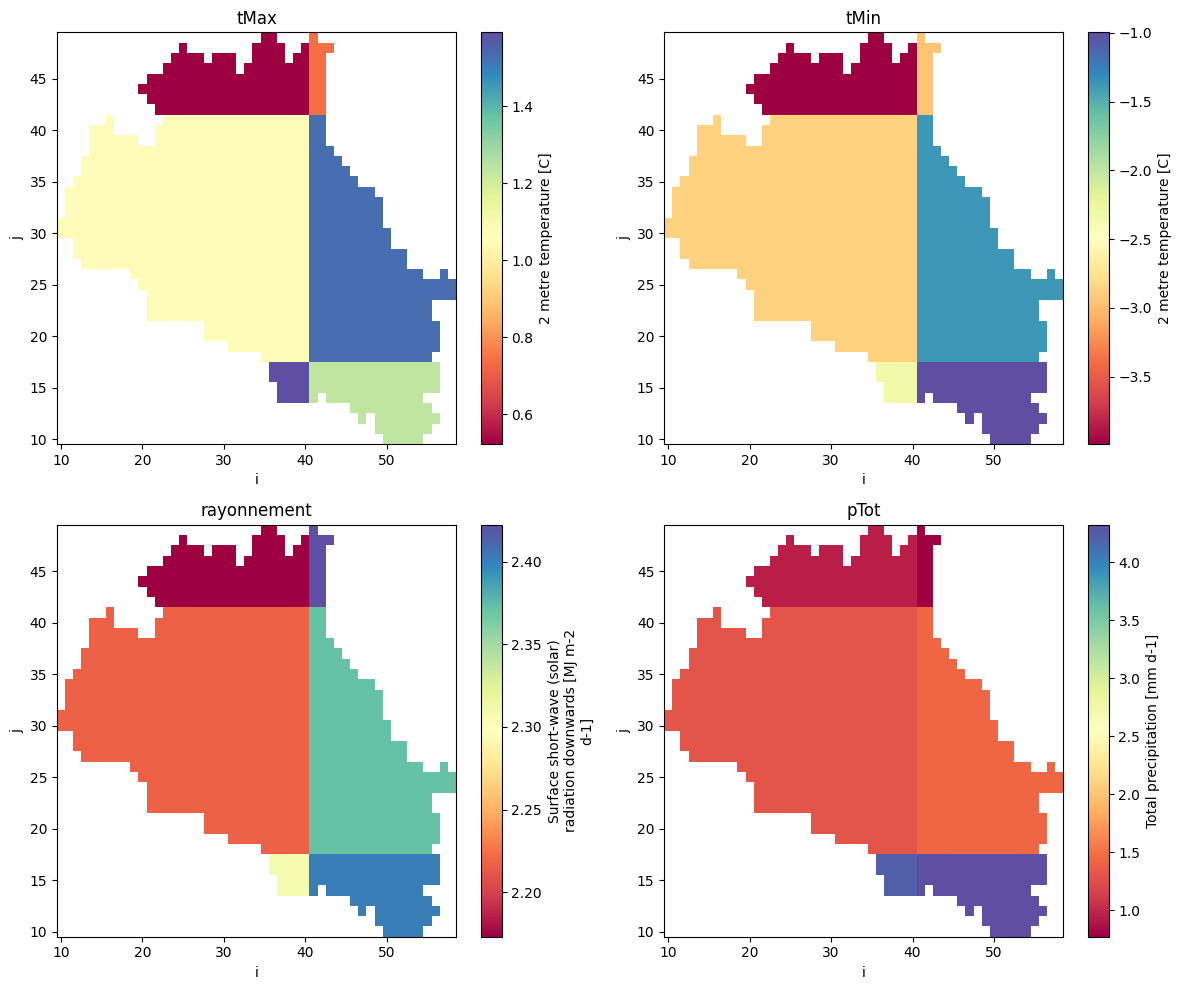
Save the final NetCDF file
The resulting CEQUEAU-ready meteorological dataset can then be written to disk.
[19]:
output_file = os.path.join(project_folder, "meteo", "meteo_cequeau.nc")
grid_cequeau.to_netcdf(output_file)
# output_file